
A better keyboard earns its keep when typing stops being invisible.
When a spacebar starts sticking during a deadline, or each long email leaves fingers oddly tense, a keyboard is no longer a minor desk accessory. Mechanical switches can offer a cleaner, more consistent press and far better repairability than many bundled membrane boards—but they are not automatically the sensible upgrade.
Value depends on the room and the work. Silent switches suit shared offices; a compact low-profile board can free a crowded desk; a full-size wired model may be better for number-heavy tasks. The right choice is the one whose sound, height, layout, and connection method disappear into the routine.


What “Mechanical” Actually Means
Mechanical keyboard
Each key has its own discrete switch mechanism, usually with a spring and electrical contacts or sensors. It describes the switch design—not noise level, weight, size, price, or a gaming focus.
Rubber-dome keyboard
A flexible rubber sheet collapses under a key to close a circuit. This common laptop-style or budget desktop design is often quiet, but can feel less distinct as it wears.
Scissor-switch keyboard
A low-profile mechanism, common in laptops, uses crossed plastic supports above a rubber dome. It keeps keys stable with short travel; it is not mechanical in the usual keyboard sense.
Actuation and bottoming out
Actuation is the point where a press registers; bottoming out is when the key reaches its physical limit. A switch can register before the key is fully pressed, which may reduce fatigue for some typists.
Linear, tactile, and clicky
Linear switches move smoothly, tactile switches provide a noticeable bump, and clicky switches add an audible click. Any of these can be light or heavy, while silent variants use dampening to reduce sound.
What feels better day to day
A good mechanical keyboard makes ordinary input feel more predictable. Each key has a distinct, repeatable actuation point, so emails and documents involve less uncertainty about whether a letter registered. A rigid plate and a heavier, non-slip chassis also keep the board from flexing or wandering across the desk during a long session.
Feedback matters even when typing is not especially fast. Tactile switches provide a small bump; linear switches feel smooth from top to bottom. Neither automatically improves words per minute—practice, layout familiarity, and technique matter far more—but clear feedback can reduce bottoming-out force and make sustained typing less fatiguing for some people.
Mechanical boards also handle simultaneous commands reliably. N-key rollover and anti-ghosting are useful for held shortcuts such as Ctrl+Shift+Arrow, complex spreadsheet navigation, and modifier-heavy application commands: every pressed key is read rather than a combination being lost.
Their longer-term appeal is practical. Switches are commonly rated for tens of millions of presses, keycaps can be replaced when legends wear, and many models allow repairs or part swaps instead of discarding the whole keyboard. That does not guarantee a better experience—poor switch choice, tall keycaps, or an awkward layout can still be tiring—but it gives the keyboard a more durable foundation.
A restrained full-size office option
The wired KC 200 MX pairs an anodized metal plate with Cherry MX2A Silent Red linear switches, rated for more than 50 million actuations. Its full N-key rollover, anti-ghosting, abrasion-resistant laser-etched caps, and dedicated calculator and volume keys suit quiet, shortcut-heavy desk work.
The switch sets the feel
A mechanical keyboard is not automatically light, loud, or satisfying. The switch’s force curve—how resistance changes from the first press to bottom-out—shapes nearly every day-to-day impression.
Three common personalities
- Linear switches move smoothly with no tactile interruption. They suit rapid repeated presses and people who prefer an even stroke, but accidental keypresses are more likely when the spring is very light.
- Tactile switches have a noticeable bump near the actuation point. That feedback can make ordinary prose feel more deliberate without requiring a key to hit the bottom, though the bump varies from subtle to sharply resistant.
- Clicky switches add an audible click, usually alongside a tactile bump. They can be satisfying in a private room, but are rarely considerate in shared homes, offices, or calls.
Numbers help, but only in context. A 45 g switch generally takes less force to actuate than a 60 g one; lighter springs reduce effort but can increase stray presses. Full-travel switches commonly travel around 4 mm, while low-profile designs shorten the stroke. Neither is inherently better: longer travel offers more cushioning and margin for control, while shorter travel can feel quicker and take up less desk space.
Lubrication also changes the result. A well-lubed switch usually sounds deeper and feels smoother; poor or absent lubrication can produce spring ping, scratchiness, and rattly keypresses. Stabilizers under large keys such as Space, Enter, and Backspace deserve equal scrutiny.
Finally, color is not a standard. “Red,” “brown,” and “blue” describe broad conventions, not guaranteed behavior across brands. A brown may be nearly linear, heavily tactile, quiet, or scratchy depending on its maker. Comparing the stated force, travel, sound tests, and—ideally—a switch tester is more reliable than buying by color alone.
A Mechanical Keyboard Is a System, Not a Volume Setting
Clicky switches are loud; silent linear and tactile switches can be remarkably restrained.
The switch’s leaf, stem and bottom-out damping shape the starting point. Compare quiet mechanical switch choices, not the word “mechanical” on a box.
Keycaps, stabilizers, case resonance and the desk can still create clack, rattle or a hollow boom.
Thick PBT caps, lubricated stabilizers, internal foam and a desk mat reduce different parts of the sound.
Heavy bottoming-out amplifies impact noise, especially on hard desks.
A lighter touch and avoiding key slam can lower volume without sacrificing accuracy.
Prefer silent linear or tactile switches, a damped case, and stable, lubricated large keys. Avoid clicky switches. A desk mat is a low-cost way to cut reflected impact noise.
Comfort depends on the whole setup
A mechanical board can make each keystroke feel more deliberate, but key feel is not ergonomics. A tall case, high-profile keycaps, or steep rear feet can still hold the wrists in extension—the familiar “bent upward” position that may become tiring over long sessions.
For most people, the useful target is a neutral wrist: hands roughly in line with the forearms, shoulders relaxed, and elbows near the body. Raising the chair or lowering the keyboard tray often helps more than changing switches. Rear kickstand feet usually increase wrist extension; leaving them folded is commonly the better starting point.
Shape and placement matter
Low-profile boards reduce front-edge height, while sculpted keycap profiles can make rows easier to reach. Neither is automatically superior: a comfortable profile is one that avoids excessive finger stretch and lets the wrists remain neutral.
Split and tented keyboards angle the halves to reduce forearm pronation, or palm-down rotation. They can be valuable for some users, but require gradual adjustment and proper positioning. The mouse should sit close enough that the reaching arm does not stay extended; a compact keyboard can create useful space for this.
Persistent pain, tingling, numbness, or weakness warrants assessment by a qualified clinician. Breaks, posture changes, workload management, and input-device placement often matter as much as the keyboard itself.
Choose a layout for the work at hand
A keyboard can have excellent switches and still be frustrating if its layout hides frequently used keys. Full-size boards retain the numpad, navigation cluster, function row, and arrows; they suit data entry, accounting, CAD, and any workflow built around dedicated keys. Their cost is width: the mouse sits farther from the body, which can make long sessions less comfortable.
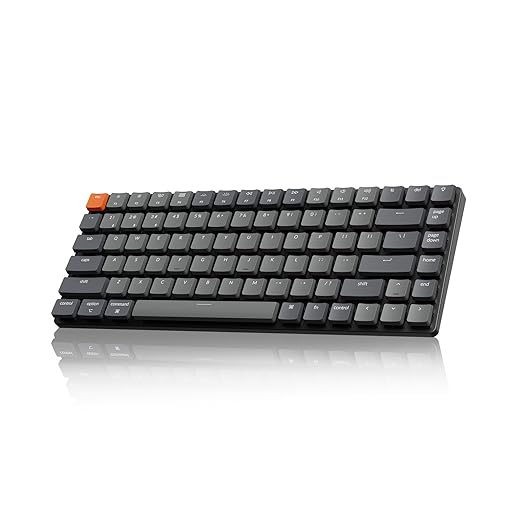
Tenkeyless (TKL) boards remove only the numpad. This is often the least disruptive choice for prose, coding, general office work, and shortcut-heavy applications because arrows, Home/End, Insert, Delete, and F-keys remain where muscle memory expects them. The reclaimed mouse space is substantial without requiring much relearning.
Smaller formats make increasingly firm trade-offs:
- 75%: keeps a function row and arrows in a tighter footprint; useful when navigation keys still matter.
- 65%: preserves arrows but usually moves some navigation commands to a layer.
- 60%: removes dedicated arrows, function keys, and navigation keys; best only when layers feel natural.
For writing, missing keys are rarely a problem until editing begins: Home, End, Page Up, and Page Down can be valuable in long documents. For spreadsheets, a numpad remains faster for repeated numeric entry, while compact boards are perfectly capable for occasional figures. Check the software shortcuts used most often, then confirm that their keys are dedicated—or that the layer combination is genuinely comfortable. A smaller board buys mouse room; it also asks for an adjustment period and more deliberate key use.
The costs that arrive after checkout
A mechanical keyboard is rarely the simplest thing to carry, configure, or share. Even compact models are thicker and heavier than many laptop keyboards, and a 75% layout may require a brief adjustment to its relocated navigation keys and function layer. That trade-off can be worthwhile at a fixed desk; it is less appealing for frequent travel or hot-desking.
RGB and remapping can also turn a straightforward peripheral into a small software project. Proprietary apps may need updates, permissions, or profiles, while onboard shortcuts can be cryptic. QMK-compatible boards offer unusually deep control and can retain layers in firmware, but programming them still asks more of the owner than plugging in a basic keyboard.
Budget mechanical boards vary sharply. A low price can conceal rattly stabilizers, thin keycaps, poor wireless reliability, nonstandard switch sockets, or a battery that is difficult to replace. “Mechanical” alone is not a quality guarantee.
Where the value can win
A well-chosen board can outlast several disposable keyboards because common parts are serviceable:
- Standard MX-style keycaps can replace worn legends or change the feel.
- Hot-swappable switches allow a failed switch to be replaced individually.
- Screwed-together cases and available batteries make repair more realistic.
For example, the slim Keychron K3 Version 2 pairs a 75% layout with Bluetooth 5.1 for up to three devices and open-source QMK support. At roughly $85, it illustrates the appeal of paying for flexibility—but also why layout adaptation and firmware preferences should be considered before buying.
Who benefits—and who can skip it
-
Writers and programmers
Long sessions can benefit from consistent actuation, durable legends, and a layout that keeps shortcuts predictable. Tactile feedback may reduce bottoming out, but only if the board’s height and angle remain comfortable.
Worth it whenA quiet tactile or light linear board with stable keys.Skip it whenBuying heavier switches solely for a “premium” feel. -
Spreadsheet and shortcut-heavy work
A full-size board earns its space when a numpad, navigation cluster, and dedicated function keys remove layer holds and hand repositioning. A compact board is still sensible when mouse travel matters more than numeric entry.
Worth it whenDedicated keys that match daily commands and data entry.Skip it whenA tiny layout that buries frequently used keys behind layers. -
Quiet spaces and travel
Mechanical does not automatically mean disruptive or portable. Silent switches, dampened stabilizers, and a compact wired board can work well; many stock boards will not.
Worth it whenMeasured noise, modest weight, and a reliable wired connection.Skip it whenClicky switches, loose stabilizers, or bulky “portable” boards. -
Laptop-keyboard contentment
Someone already accurate and comfortable on a laptop keyboard has no productivity problem to solve. A separate board is worthwhile only for ergonomics, repairability, or a needed layout.
Worth it whenA specific friction point worth fixing.Skip it whenExpecting a mechanical board to create speed or comfort by itself.
-
Name the recurring annoyance
List the task that causes fatigue, errors, noise complaints, or awkward reaching—not a preferred switch color or sound.
-
Choose the layout before the switch
Confirm numpad, navigation keys, function row, and desk footprint against real work.
-
Test the risky variables
Try a returnable board or switch tester for noise, front height, and resistance; typing for ten minutes reveals more than a single key press.
-
Buy conservatively
Prefer a wired, standard-layout model with a return window. For a broader shortlist, start with what keyboard to buy based on the job it must do.
A wrist rest is not automatically necessary; it should support pauses, not force the wrists upward while typing.
A mechanical keyboard is worth it when it solves a real work constraint
- Prioritize layout, noise, and desk ergonomics before switch type.
- Treat a return policy as part of the product, especially when buying untested switches.
For frequent writers, programmers, and data-heavy users, a well-chosen mechanical keyboard can be a durable comfort and workflow upgrade. For quiet offices, travel, or satisfied laptop typists, it is only worth buying when a specific need—noise control, layout access, or serviceability—outweighs the extra cost and bulk. Start with the task, test the feel, and keep the first purchase easy to return.