A clean desk and a rock-solid connection can pull in different directions.
A laptop, tablet, and phone can share one uncluttered workspace—until pairing delays or a waking keyboard interrupts the flow. A conventional 2.4 GHz wireless keyboard, using its USB receiver, is usually the more dependable desktop choice: it wakes quickly, maintains a dedicated link, and avoids Bluetooth’s occasional device-switching quirks.
Bluetooth earns its place when a keyboard must move between hosts without sacrificing scarce USB ports. Its real advantage is flexibility, not simply freedom from a cable. The deciding question is which annoyance matters more: managing a tiny receiver on one primary computer, or accepting that multi-device convenience can involve a little more connection housekeeping.
- Bluetooth can pair with several devices, but switching support varies by keyboard.
- A 2.4 GHz receiver is often preferable for low-latency gaming and fixed desktop use.
Pick the connection style that matches the desk


A “wireless” label does not guarantee a receiver is included, and Bluetooth support does not automatically mean one-button switching among several devices. Confirm the box contents, operating-system compatibility, and the number of devices that can stay paired or connected at once.
For receiver-based models, check whether the USB-A dongle needs an adapter for USB-C-only laptops. For tri-mode boards, verify that the advertised switching works across the intended Bluetooth, 2.4 GHz, and wired sources—not merely that all three modes exist.
What “wireless” actually means
Wireless keyboard
This is the umbrella label, not a connection type. It can describe a Bluetooth model, a keyboard with a dedicated USB receiver, or one that supports both.
Bluetooth
Bluetooth is a radio standard already built into most laptops, tablets, and phones. A keyboard such as the Logitech K250 pairs directly with the host, leaving USB ports free; switching among saved pairings is its real advantage.
2.4 GHz wireless receiver
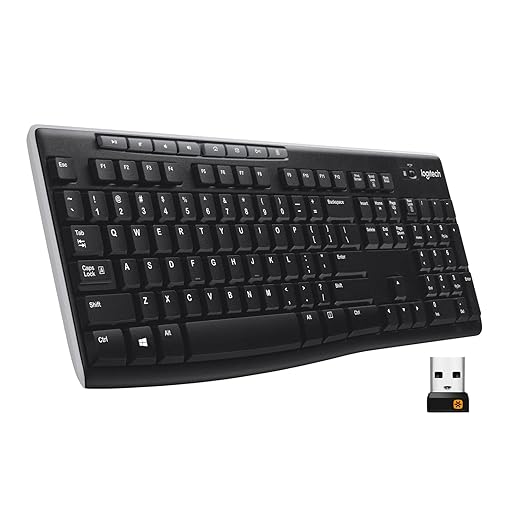
This connection uses a small USB dongle that creates a dedicated link with the keyboard, as on the Logitech K270. It is not Wi‑Fi, and it usually needs no Bluetooth setup. The receiver commonly delivers quicker wake behavior and steadier input in busy radio environments.
Tri-mode
Tri-mode is practical shorthand for three usable paths: Bluetooth, a 2.4 GHz receiver, and wired USB. The Redragon K521KS can move between device-friendly Bluetooth, receiver-based play, and a cable connection for charging or uninterrupted use.
Paired device vs. receiver slot
Bluetooth remembers device pairings; receiver mode depends on the plugged-in dongle. A keyboard advertised with several devices may mean several Bluetooth profiles, not several simultaneous receiver connections.
|
Bluetooth, portable
Logitech K250 Compact Bluetooth Keyboard with Numpad
|
VS |
2.4 GHz receiver
Logitech K270 Full-Size Wireless Keyboard for Windows
|
|---|---|---|
|
Pairing-based
|
Device switching |
Receiver-bound
|
|
No
|
USB port needed |
Yes
|
|
Bag or small desk
|
Best placement |
Permanent workstation
|
|
Portable convenience
|
Battery focus |
Up to 2 years claimed
|
| Check price | Check price |
The details that decide comfort
-
Moving between devices
Bluetooth is the cleaner choice for a laptop, tablet, or phone rotation, especially when USB ports are scarce. A receiver is usually tied to the computer where it remains plugged in.
ChooseBluetooth or dedicated switch keysSkipA single-receiver setup for multi-device work -
Wake and responsiveness
A 2.4 GHz receiver often wakes more immediately and behaves more consistently at a fixed desk. For documents, coding, and spreadsheets, Bluetooth latency is normally imperceptible; fast competitive games are the exception.
ChooseReceiver for instant wakeSkipJudging office work by gaming demands -
Battery and ports
Bluetooth frees a USB-A or USB-C port but still needs battery management. Receiver keyboards occupy a port, yet can deliver exceptionally long battery life; the K270 is rated for up to two years.
ChooseThe resource in shortest supplySkipAssuming all wireless batteries last alike -
Radio conditions
Congested 2.4 GHz environments, metal desks, hubs, and a receiver hidden behind a PC can all degrade a link. Keeping the receiver close and clear often matters more than the connection label.
ChooseA clear, nearby radio pathSkipReceiver placement behind metal
A full numpad without the USB dongle
Best for clutter-free desks and compact full functionality
The Logitech K250 is a small Bluetooth keyboard built for desks that revolve around a laptop or tablet rather than a permanent tower. It keeps a numeric keypad and function row in the layout while leaving a valuable USB port open for charging, storage, or a monitor adapter.
- Bluetooth connection needs no receiver
- Compact layout retains a number pad
- Works with laptops and tablets
- Spill-resistant design
- AAA batteries are included
- Not designed around competitive gaming latency
- Deep-profile keys are less travel-slim than some portable boards
- Bluetooth can be less immediate to wake than a dedicated receiver
The K250 makes Bluetooth feel practical rather than compromised for compact productivity desks. It preserves a full numeric pad in a modest footprint and avoids occupying a laptop’s often-limited USB ports. For fast-twitch games, a receiver-based or wired keyboard remains the more appropriate tool.
Logitech K270: familiar receiver-first computing
Best for familiar layouts and long battery life
The Logitech K270 is a full-size Windows-oriented keyboard for a computer that largely stays put. Its compact Unifying receiver creates a simple, dedicated link: plug it in once and the keyboard is ready, rather than reopening Bluetooth settings after a device change or troubleshooting a hesitant reconnect. The conventional QWERTY layout and number pad make it an easy fit for everyday documents, spreadsheets, and desktop work.
- Tiny Unifying receiver enables plug-and-play use
- Full-size layout with dedicated number pad
- Claimed two-year battery life
- Spill-resistant build suits busy desks
- Occupies a USB-A port
- No practical switching between computers or tablets
- Receiver is an extra piece to track when travelling
- No backlighting for dim workspaces
Choose the K270 for a settled workstation, not a roaming device collection. The receiver-first setup delivers the uncomplicated behavior many fixed PCs need: wake the computer and start typing. It trades Bluetooth’s port-free convenience and device switching for a dependable, familiar full-size setup at a low price.
One keyboard for the whole desk
Best for customizable multi-device gaming setups
The Redragon K521KS is built for setups that move between a gaming PC, a work desktop, and a second device without making connection choice a daily compromise. Bluetooth can keep a tablet or laptop paired without consuming a port; the 2.4 GHz receiver suits the primary PC when fast wake-up and a stable gaming link matter; USB-C provides a no-battery, no-radio fallback for long sessions or troubleshooting.
It is a more expressive alternative to quieter wireless mechanical keyboard choices, aimed at people who value RGB effects, remapping, and macros as much as a clean multi-device workflow. Its advertised five-device capacity makes the switching feature meaningful rather than decorative.
- Bluetooth, receiver, and USB-C cover distinct desk roles
- Up to five paired devices supports genuine multi-device use
- RGB lighting, macros, and key remapping add customization
- 4,000mAh rechargeable battery avoids disposable cells
- Mechanical-style gaming design is louder than office-focused boards
- RGB and full gaming controls create more visual and physical bulk
- Configuration software is most relevant to Windows users
- Battery life varies substantially with lighting use
Quick take A remarkably broad connection toolkit at an entry-level price. It earns its place when each mode will actually be used, rather than merely admired on a spec sheet.
The K521KS is the sensible step up for a desk that is both a workstation and a gaming station. Its receiver should handle the main PC, Bluetooth the auxiliary device, and USB-C the fail-safe role—a practical division that simpler wireless keyboards cannot offer.
The trade-off is deliberate: RGB and a mechanical gaming character bring personality and control, but not the compactness or hush of an office keyboard. At roughly $25, that is an unusually fair compromise for users who need all three connection paths.
Match the Connection to the Desk
Choose Bluetooth when a keyboard moves between devices or USB ports are scarce. Choose a 2.4 GHz receiver for a permanent desktop where instant wake and steady response matter most. Choose tri-mode when one board must serve both roles.
Before buying, confirm OS compatibility, regional layout and numpad needs, whether the receiver is included, how device switching works, and—most importantly—whether the key feel suits long sessions.