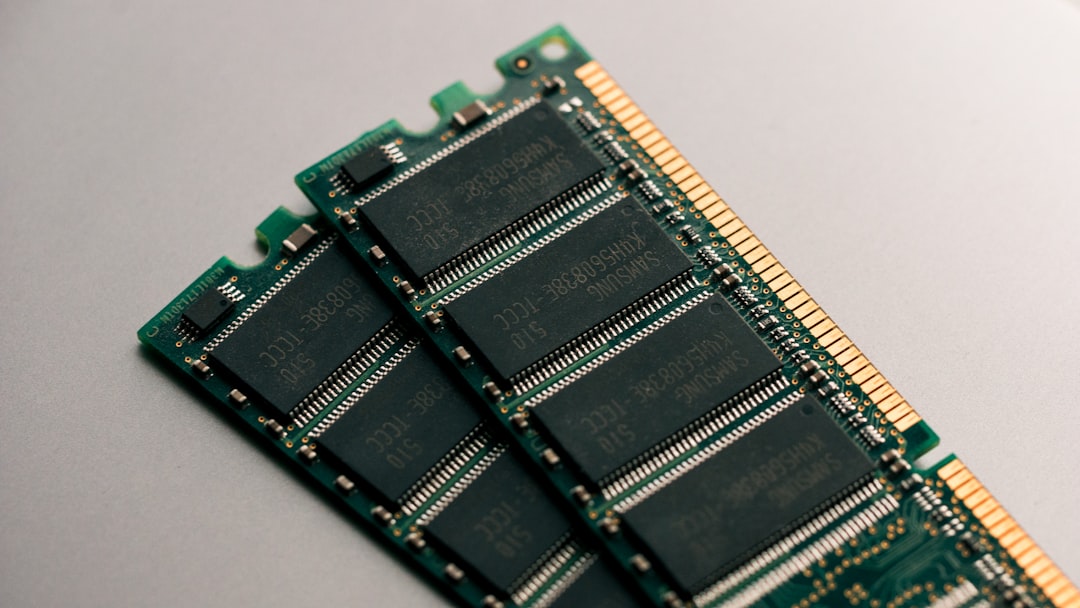
A RAM kit earns trust by starting cleanly and staying stable—not by wearing the more familiar badge.
A tempting DDR5-6000 deal can turn into a frustrating afternoon when a laptop accepts only standard JEDEC settings, or a desktop needs a BIOS update before its advertised EXPO/XMP profile will train. The safer purchase is the kit the platform can run as intended.
Crucial and Kingston are both established memory makers, but their ranges behave differently. Crucial’s mainstream modules commonly prioritise broadly supported JEDEC specifications; Kingston FURY kits more often target tuned performance profiles and may offer tighter timings. That makes neither logo automatically “better.” Motherboard QVL status, CPU memory-controller limits, DIMM versus SO-DIMM format, capacity per slot, and whether the system supports XMP or EXPO matter more than a headline transfer rate. A slightly slower kit that boots reliably at its rated settings is the real bargain.
- Desktop DDR5-6000 is not a universal laptop upgrade: laptops use SO-DIMMs and usually require JEDEC-speed memory.
- Two matching modules generally enable dual-channel operation; mixing old RAM can force lower speeds or instability.
Match the kit to the machine


A 288-pin UDIMM will not fit a 262-pin SO-DIMM slot. Also verify whether memory is soldered, whether both slots are accessible, and whether the platform can run the kit’s advertised speed rather than falling back to a lower default.
Check the platform before the brand
-
DDR generation and form factor
DDR5 will not fit a DDR4 slot, and desktop UDIMMs are physically different from laptop SO-DIMMs. Confirm the motherboard or notebook manual before ordering.
Safe choiceThe exact DDR generation and DIMM format specified by the system.Common mismatchAssuming any DDR5 module fits every DDR5-equipped machine. -
Capacity and module layout
Check both the board’s total-memory ceiling and its per-slot limit. A factory-matched 2×16GB kit is normally safer than combining separate sticks, even with identical labels.
Safe choiceA validated capacity in a matched kit for the intended slots.Common mismatchMixing capacities, ranks, or separately purchased kits. -
CPU and firmware support
Memory-controller limits vary by processor, while a current BIOS often improves DDR5 training and profile compatibility. Consult the board QVL when targeting high data rates.
Safe choiceA supported CPU, updated BIOS, and sensible QVL confirmation.Common mismatchTreating the motherboard's headline speed as a guarantee. -
Rated speed versus boot speed
JEDEC settings prioritize broad, automatic startup. DDR5-6000 on the FURY Beast generally needs its XMP or EXPO profile enabled; the Crucial DDR5-5600 kits emphasize standard settings.
Safe choiceJEDEC speed for lowest-friction booting, or a verified profile for performance.Common mismatchExpecting profile-rated speed without enabling and testing it.
A kit can be excellent and still run below its box rating on first boot. Enable XMP or EXPO only after confirming the board, CPU, and BIOS support it; then run a memory test before relying on the system.
For capacity planning, workloads, and slot-population examples, see how to choose the right RAM upgrade.
Kingston FURY Beast for verified DDR5-6000 builds
Top choice for high-speed desktop performance
The 32GB (2×16GB) Kingston FURY Beast DDR5-6000 CL30 kit is aimed at desktops where memory tuning is part of the build plan, not an afterthought. Its 6000MT/s tier and tight CL30 timing make it a particularly attractive match for modern gaming rigs, creator workstations, and AMD platforms built around EXPO.
This is not a universal plug-and-play recommendation. The motherboard’s memory QVL should list the kit or a closely matching configuration, the BIOS should be current, and the CPU’s memory controller needs to sustain DDR5-6000 with the EXPO profile enabled. Without those checks, the safer choice is a lower validated speed rather than hoping an aggressive profile will train reliably.
- DDR5-6000 CL30 is a strong enthusiast-performance target
- 32GB dual-channel capacity suits demanding games and multitasking
- AMD EXPO support simplifies rated-profile setup
- Low-profile heat spreader avoids many cooler-clearance conflicts
- Rated speed depends on motherboard, BIOS, and CPU controller quality
- EXPO must be enabled; default settings run slower
- Not the conservative option for unverified boards or mixed memory kits
- A 2×16GB kit leaves fewer free slots for later expansion
Bottom line A compelling performance kit when DDR5-6000 CL30 is validated for the exact platform. For a risk-averse build, verified stable operation matters more than its impressive headline speed.
Crucial’s no-fuss DDR5 desktop upgrade
Reliable desktop upgrade for modern Intel and AMD systems
Crucial’s 32GB (2×16GB) DDR5-5600 kit is built for the buyer who wants a clean, mainstream move to DDR5 rather than a memory-tuning project. It uses standard 1.1V DDR5-5600 operation, making it a sensible fit for compatible 13th-gen Intel and Ryzen 7000 desktops where dependable 32GB capacity matters more than chasing benchmark peaks.
DDR5-5600 is the rational stopping point when the machine is used for everyday productivity, large browser sessions, creative work, or gaming with a GPU-bound workload. A platform that runs DDR5-6000 well does leave performance on the table: 5600 delivers about 7% less theoretical bandwidth, while this kit’s CL46 primary latency is materially looser than a 6000 CL30 performance kit. The difference is most visible in CPU-sensitive games and memory-heavy workloads, not ordinary multitasking.
For a system remaining on the older standard, recommended 32GB DDR4 desktop kits remain the appropriate comparison—not an excuse to force DDR5 onto a DDR4 board.
- 32GB dual-channel capacity
- Standard 1.1V DDR5 operation
- Works across listed Intel and AMD platforms
- No profile tuning required
- CL46 is relatively high
- Less bandwidth than DDR5-6000
- Gives up CPU-limited gaming performance
Crucial’s DDR5 SODIMM kit for serviceable laptops
Best fit for upgrading compatible DDR5 laptops
This 32GB (2×16GB) Crucial kit is a conventional 262-pin DDR5 SODIMM upgrade, intended for laptops with two accessible, replaceable memory slots. Its 5600 MT/s rating is only relevant when the laptop’s CPU and firmware support it; otherwise, compatible systems may run it at 5200 or 4800 MT/s.
Before ordering, confirm that the machine uses DDR5 SODIMMs rather than soldered memory, accepts 16GB modules in each slot, and permits a 32GB total. Those checks matter more than the label on 16GB laptop memory modules.
- Standard DDR5 SODIMM form factor
- Matched 32GB dual-channel capacity
- JEDEC-oriented 1.1V operation
- Can downclock on supported platforms
- Useless in soldered-memory laptops
- 5600 speed depends on platform support
- 32GB may exceed some OEM limits
- No performance profile headroom
|
Tuned desktop pick
Kingston FURY Beast 32GB DDR5-6000 Kit
|
VS |
Straightforward upgrade
Crucial 32GB DDR5-5600 Desktop Kit
|
|---|---|---|
|
32GB (2×16GB)
|
Capacity |
32GB (2×16GB)
|
|
DDR5-6000
|
Rated speed |
DDR5-5600
|
|
CL30
|
Rated latency |
CL46
|
|
AMD EXPO verified
|
Best operating path |
JEDEC-style simplicity
|
|
Higher
|
Setup sensitivity |
Lower
|
| Check fit | Check fit |
When 16GB forces a game, browser, editor, or virtual machine to page data to storage, moving to 32GB or 64GB is usually far more noticeable than moving from DDR5-5600 to DDR5-6000. Capacity removes a hard constraint; frequency only improves work that is already memory-bandwidth or latency sensitive.
With both kits at 32GB, Kingston is the stronger choice for a desktop proven stable with its EXPO profile: 6000MT/s and CL30 offer materially better tuned specifications. Crucial is the safer fit where dependable plug-in operation matters more than manual BIOS checking or profile validation. Neither result transfers automatically to laptops, DDR4 boards, or platforms with modest memory-controller headroom.
The setup mistakes that make good RAM look bad
DDR5 must match the board, CPU memory controller, BIOS, and supported profile type.
Install the latest stable BIOS first, then confirm the kit is on the motherboard QVL where possible. A DDR5-6000 EXPO kit may fall back to JEDEC speed—or fail training—on an unvalidated platform.
Mixed kits can use different memory chips, SPD data, and timings, even under the same brand and model name.
Use a single matched kit whenever possible. If modules must be mixed, start at default settings, test thoroughly, and expect a lower stable speed than either kit’s rating.
Many systems boot at conservative JEDEC settings until EXPO or XMP is enabled in firmware.
Place two DIMMs in the manual’s preferred paired slots—commonly A2 and B2—then enable the correct profile and verify the reported speed. Run MemTest86 or a long memory stress test before trusting the upgrade.
Buy for the platform, not the logo
- A desktop whose QVL and BIOS support DDR5-6000 EXPO can safely favor Kingston FURY Beast for its stronger tuned performance.
- For a standard DDR5 desktop upgrade—or a laptop with accessible SODIMM slots—Crucial is the lower-risk choice when its rated speed matches OEM support.
Start with the computer: confirm DDR generation, UDIMM versus SODIMM, supported capacity, and the speed it will actually run. Then buy a matched kit rather than mixing existing modules.
Kingston FURY Beast is the sensible pick for a verified AM5 desktop prepared to run its DDR5-6000 CL30 EXPO profile. Crucial is the safer default for systems intended to operate at ordinary JEDEC-rated settings, and Crucial’s SODIMM kit is the relevant option for compatible serviceable laptops. A faster label has no value if the platform cannot use it reliably.
A desktop UDIMM cannot fit a laptop SODIMM slot, and a kit may downclock when the CPU, motherboard, or laptop firmware does not support its advertised speed. Form factor, capacity, and supported speed decide the safe purchase.