A low sticker price is only a bargain if it still feels capable after the next few game releases.
A $699 sale tag can look irresistible—until a new game turns its 8GB of RAM, cramped SSD, or older graphics chip into the bottleneck. Credible 1080p gaming does fit under $1,000, especially with sensible settings, DLSS where available, and expectations short of maxed-out ray tracing. The important distinction is whether the laptop has enough headroom to stay enjoyable.
Prioritize a current GPU tier, 16GB of memory (or an accessible upgrade path), and a 512GB SSD at minimum; modern game libraries fill smaller drives with alarming speed. Screen quality, cooling, and the graphics card’s power limit matter too: two laptops carrying the same RTX label can perform noticeably differently. A discounted RTX 3050 machine can still suit esports and older AAA games, while an RTX 4050 generally buys more longevity through stronger performance and newer frame-generation support.
- Look for a GPU power rating and dual-channel RAM rather than judging by the GPU name alone.
- Confirm whether storage and memory are user-upgradeable before treating a low price as a long-term deal.
A laptop earned consideration only when its parts work together rather than look impressive on a spec sheet.
Priority went to practical 1080p play in current games, with settings and DLSS available to preserve smooth performance instead of chasing unrealistic maximum presets.
16GB memory, a 512GB SSD, sensible CPU pairing, accessible RAM or storage, and cooling capable of sustaining boost clocks mattered as much as the graphics badge.
Panel brightness, color, refresh rate, and response behavior were weighed alongside GPU performance; a fast but dim, washed-out display weakens the bargain.
Street prices, not launch MSRPs, set the value line. An RTX 4050 is usually the meaningful jump: newer features, 6GB VRAM, and notably stronger 1080p headroom than RTX 3050 models.
The same model name can conceal a lower-power GPU, 8GB RAM, a 144Hz panel with poor color coverage, or limited upgrade access. Confirm the GPU wattage, memory layout, display specification, SSD capacity, and current sale price—not just the headline configuration.
Four clear ways to spend the budget
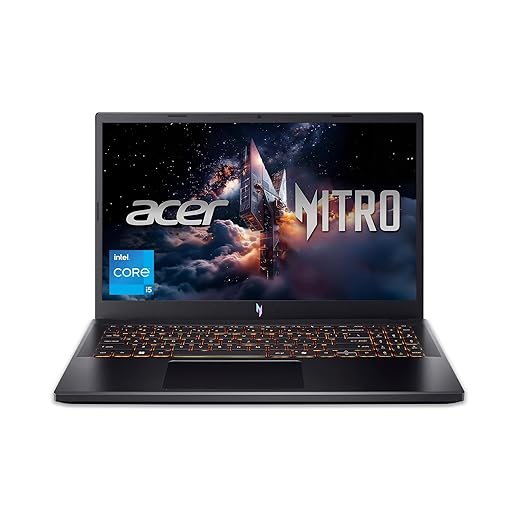
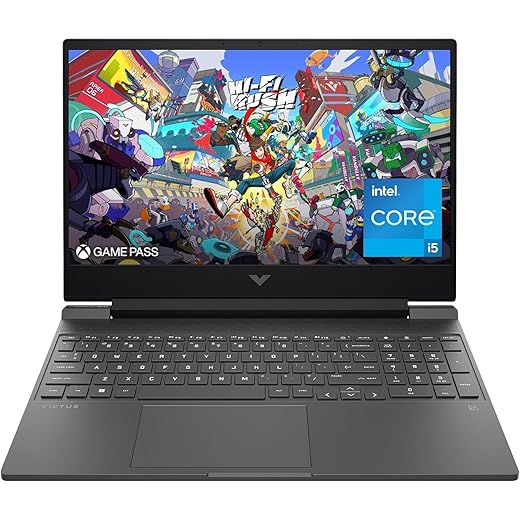

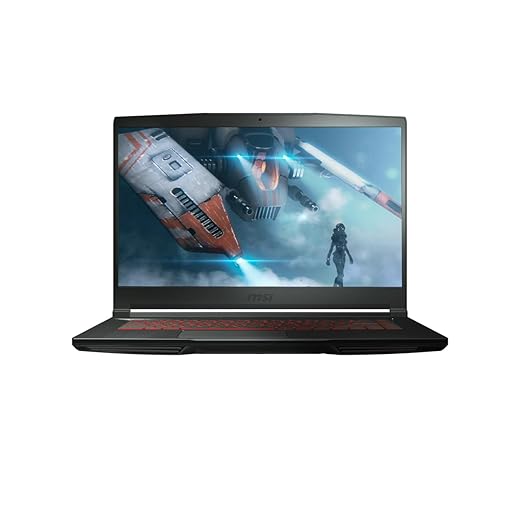
Acer Nitro V 15: the RTX 4050 stretch pick
01
Top choice for high-refresh 1080p gaming
At around $950, this Nitro V is the configuration to chase when the budget can bend without crossing $1,000. Its RTX 4050 brings DLSS 3 frame generation and more 1080p breathing room than older RTX 3050 machines, making demanding new releases easier to approach at sensible settings. It is the more future-minded alternative to bargain hunting for RTX 4060 laptops under $1,000, which are rarely available at this price.
The listed model has only 8GB of RAM, so the exact SKU matters: confirm memory capacity and upgradeability, SSD size, 165Hz panel, and—especially—RTX 4050 wattage before checkout.
- RTX 4050 supports DLSS 3 frame generation
- 165Hz IPS screen suits fast esports games
- Strong 1080p headroom for the money
- 512GB PCIe Gen 4 SSD included
- Listed 8GB RAM is restrictive in current games
- GPU power limit must be verified by SKU
- 512GB fills quickly with large game libraries
- Chassis is less refined than premium rivals
The Nitro V earns the stretch because its RTX 4050 has capabilities older budget GPUs lack, not merely a higher model number. Buy only after checking the exact configuration: 16GB RAM, a suitably powered GPU, and the advertised 165Hz panel turn it into a much stronger long-term 1080p machine.
Best for balanced performance and generous memory
The HP Victus 15 is the comfortable all-rounder: a 15.6-inch, 144Hz machine with 16GB of memory, a 512GB SSD, and an RTX 3050 6GB for established 1080p games. It suits buyers who split time between classes, work, streaming, and gaming, rather than treating the laptop as a pure frame-rate chase.
Its value is intensely price-dependent. At roughly $850, it is only a small step below an RTX 4050 Acer Nitro V; the Victus becomes the smarter compromise only when the saving is substantial enough to outweigh the newer GPU’s longer runway.
- 16GB RAM is ready for modern multitasking
- 144Hz IPS display suits fast-paced games
- RTX 3050 has 6GB VRAM
- 512GB SSD avoids bare-minimum storage
- RTX 3050 trails RTX 4050 by a meaningful margin
- No DLSS 3 frame generation support
- Older GPU architecture limits future headroom
- Seven-pound listed weight reduces portability
The Victus has the practical baseline many budget gaming laptops miss: 16GB RAM, 512GB storage, and a 144Hz panel without immediate upgrade pressure. Its RTX 3050 can still deliver enjoyable 1080p play, especially in competitive and less demanding games.
But an RTX 4050 brings newer features and appreciably better long-term performance. Buy the Victus when it sits far enough below the Nitro V to make that compromise feel worthwhile—not when the price gap is merely token.
Affordable option with a capable 12th Gen processor
The sensible RTX 3050 floor
At around $780, this 2022 Victus 15 is the dedicated-GPU option for a tighter budget: a Core i5-12500H, RTX 3050, 8GB of system memory, and a 512GB SSD in the listed configuration. It suits 1080p players comfortable targeting sensible settings rather than chasing the newest visual features.
- Capable 12th-gen Core i5
- Dedicated RTX 3050 graphics
- 512GB SSD included
- Room for RAM upgrade
- Only 8GB system memory
- Older GPU generation
- Listings vary substantially
- FHD panel specs unclear
This Victus earns consideration when it is meaningfully cheaper than an RTX 4050 laptop, not merely a little cheaper. Confirm the exact sale SKU before ordering: RAM capacity and slots, SSD size, panel refresh rate and brightness, battery size, and GPU power limit can change the experience more than the shared model name suggests. Budgeting for 16GB of dual-channel memory makes particular sense here.
Lightweight choice with ample memory and fast storage
At 4.1 pounds, the MSI GF63 Thin earns consideration when a gaming laptop also has to cross campus, commute on trains, or live in a backpack every day. Its Core i5-11400H, 16GB of memory, 512GB SSD, 144Hz 1080p screen, and RTX 3050 make it a practical older-spec machine for lighter esports play and coursework between sessions. The appeal is not maximum frames per dollar; it is avoiding the fatigue of hauling a much thicker, heavier gaming chassis.
- 4.1-pound carry weight
- 16GB RAM included
- 144Hz 1080p display
- 512GB NVMe SSD
- RTX 3050 is dated
- Lower sustained GPU power
- Fans get conspicuously loud
- Keyboard and underside run warm
The GF63 Thin makes sense when 4.1 pounds materially changes whether the laptop gets carried every day. Its RTX 3050 is increasingly restrictive in new demanding games, and the thin chassis means louder cooling, warmer touch surfaces, and less sustained GPU performance than bulkier rivals with similar graphics.
At roughly $880, it needs a clear price advantage over RTX 4050 options to justify the compromise. Otherwise, the lighter bag is its defining reason to buy.
Why RTX 4050 changes the experience
An RTX 3050 laptop can still make a fast 144Hz screen feel worthwhile in esports. Games such as Valorant, Rocket League, and Overwatch 2 are generally light enough for high frame rates at 1080p, often with competitive settings. Its limits arrive sooner in newer, GPU-heavy releases, where texture quality and ray tracing compete for scarce video memory.
The RTX 4050 is not merely a modest step in raw speed. Its newer Ada architecture brings DLSS 3 Frame Generation, which can lift perceived smoothness in supported single-player games, plus noticeably stronger ray-tracing hardware. More importantly, it commonly has 6GB of VRAM versus 4GB on many RTX 3050 laptops. That extra headroom reduces the need to drop textures or accept stutter when modern games exceed a 4GB allocation.
Laptop labels conceal an important caveat: wattage matters. A higher-power RTX 4050 in a well-cooled Nitro V can sustain much more performance than a low-power version in a thin chassis; the same applies to RTX 3050 machines. For demanding 2024–2025 1080p games, the 4050 is the safer choice for high settings, DLSS, and occasional ray tracing. An RTX 3050 remains a value play when discounted heavily, especially for esports and older libraries.
The GPU name is only the starting point
GPU power limits and cooling can separate models with the same chip.
A well-cooled, higher-wattage 4050 sustains faster clocks; a thin chassis may throttle sooner.
16GB in dual-channel mode should be the baseline.
Modern games, launchers, and background tasks can overwhelm 8GB, while one memory stick can also limit performance.
Brightness and color coverage matter alongside refresh rate.
A dim, narrow-gamut panel looks flat indoors and struggles near windows, however smooth its motion appears.
16GB RAM, preferably dual-channel: verify whether memory is one or two sticks.
512GB SSD minimum: large modern games quickly consume a 256GB drive.
Panel specifics: seek 144Hz or 165Hz, then check brightness and color coverage.
GPU wattage and reviews: listed TGP and sustained benchmarks reveal the real speed.
Cooling and upgrades: thicker 17-inch gaming laptops often sustain performance better, but check fan noise and accessible RAM/SSD slots.
What 1080p performance really looks like
An RTX 4050 laptop can drive well above 100 fps in esports staples such as Valorant, Rocket League, and Fortnite with competitive settings, making a 144Hz or 165Hz panel genuinely useful. RTX 3050 machines remain capable for these games, though newer titles leave less performance headroom.
For cinematic releases, the sensible target is usually a smooth 60 fps rather than every slider at Ultra. Start at 1080p High, then use DLSS or FSR; reduce ray tracing first, followed by shadows and volumetric effects. Frame generation on the RTX 4050 can improve perceived fluidity, but it works best when the base frame rate is already healthy.
Quoted benchmarks assume wall power. On battery, gaming laptops sharply limit GPU power and may deliver roughly half the frame rate, while draining quickly. For results close to reviews, select the maker’s Performance or Turbo mode, install current GPU drivers, and leave the rear and side vents clear on a hard surface.
Plug in the included charger for demanding games. A balanced mode is often better for everyday work; reserve maximum-performance profiles for gaming, where extra fan noise and heat are expected.
The checks that prevent a false bargain
Is a sale-priced RTX 3050 still worth buying?
Yes, but only when it is substantially cheaper than the Acer Nitro V—roughly $150–$200 less—and has 16GB RAM. At smaller gaps, the RTX 4050’s 6GB VRAM, DLSS 3, and longer relevance overwhelm the saving.
When is the RTX 4050 premium justified?
It is the sensible stretch for new AAA games, ray tracing, or keeping the laptop beyond a short ownership cycle. A buyer focused on lighter esports games can save with a discounted Victus 3050 instead.
Which upgrades matter most?
Prioritize an accessible second RAM slot and M.2 SSD bay; 16GB dual-channel memory is the immediate target. Check the exact SKU’s service manual, since similarly named listings can differ.
Is an extended warranty worthwhile?
Skip retailer plans that cost a large share of the discount; manufacturer coverage and a credit-card benefit are often enough. Put that money toward RAM, storage, or a better GPU, and consider how long a budget laptop should last before paying for extra years.
Buy the capability, not the sticker
- Confirm GPU wattage, RAM configuration, display specification, and upgrade access on the exact listing before ordering.
The Acer Nitro V RTX 4050 is the clear pick near $950: it brings the performance headroom and features that make demanding 1080p games enjoyable for longer. The HP Victus RTX 3050 earns its place only at a decisive discount; it is the sensible value choice for esports and older games. Choose the MSI GF63 Thin when low carrying weight matters more than sustained frame rates. Favor complete capability and exact listing details over a familiar badge or headline discount.