A 1TB SSD is no longer a luxury when a single game can consume more than 100GB.
Install Call of Duty, Baldur’s Gate 3, and a few current AAA releases on a 512GB laptop, then allow for Windows updates, shader caches, and save files: free space disappears remarkably fast. Once an SSD is nearly full, routine patching becomes an exercise in uninstalling rather than playing.
The lowest sticker price can hide worse compromises. A 1TB drive matters most when it is paired with a capable GPU, sufficient RAM, a display worth looking at, and an upgrade path for later. A weak graphics chip turns storage into a library of games that cannot run well; soldered memory and a single inaccessible drive bay shorten the machine’s useful life. The stronger budget choices balance capacity with real gaming fundamentals, rather than using a large SSD to distract from cut-down hardware.
- Aim for 16GB RAM minimum; modern games increasingly exceed 8GB.
- An extra M.2 slot is more valuable than a proprietary or difficult-to-access storage layout.
What “cheap” really means
A true entry-level 1TB gaming laptop usually lands around $600–$800 on sale. Expect a mainstream GPU, 16GB RAM, and compromises such as a dimmer 144Hz panel or a smaller battery. The strongest value tends to sit at $800–$1,100, where RTX 4050-class graphics and better displays become realistic.
Above roughly $1,100, the extra money should buy a meaningful GPU jump—such as an RTX 5060—not merely a fancier lid or RGB. Sale prices move quickly, and the same model name can cover radically different configurations.
Before ordering, check the retailer’s full specification sheet for:
- Internal 1TB SSD, not “up to 1TB” or bundled external storage
- Exact GPU and its wattage where listed
- 16GB RAM minimum and whether it is upgradeable
- Panel resolution, brightness, and refresh rate
- The actual seller, return policy, and warranty
Retail listings often reuse photos and names across CPU, GPU, RAM, and SSD variants. Match the SKU or model number to the listed specifications before paying.
Five 1TB laptops, matched to different priorities


Specs matter only in the exact configuration
Each laptop is judged as the retailer sells it—not by the best specification available elsewhere in the series.
GPU model, VRAM, and its configured power limit carry more weight than headline FPS. Results should hold at the panel’s native resolution before DLSS, FSR, or frame generation is considered.
CPU, 16GB-or-better memory, SSD speed and M.2 expansion, panel refresh/color, and cooling determine whether a good GPU remains enjoyable in long sessions.
Delivered price, warranty/support, retailer reliability, and included storage are weighed together; a low sticker price can conceal a weaker GPU or less usable display.
Upscaling can be excellent, and frame generation can make demanding games look smoother. Neither replaces adequate native GPU performance: frame generation adds latency, while aggressive upscaling can soften fine detail. Promotional figures are most useful when the tested resolution, quality preset, power mode, and feature settings are stated.
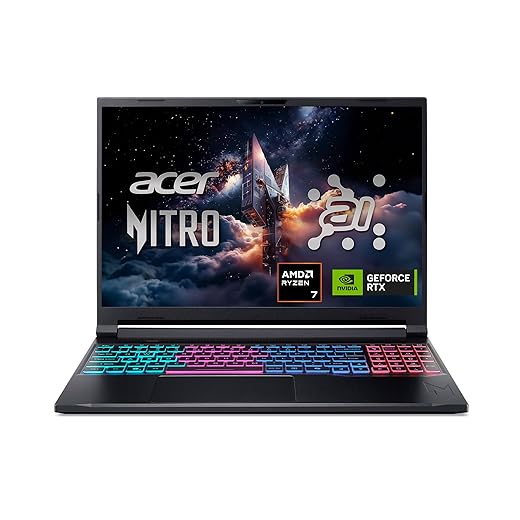
Acer Nitro V 16S AI: the 1TB option with the most gaming runway
01
Best for portable high-performance gaming
This exact ANV16S-41-R2AJ configuration pairs a Ryzen 7 260 with an RTX 5060 Laptop GPU, 32GB of DDR5 memory, and a 1TB Gen4 SSD. It suits players who want room for a large installed library while aiming at demanding current games rather than merely meeting minimum settings.
At 4.6 pounds, it is meaningfully easier to carry than many 16-inch gaming machines, while its 180Hz WUXGA panel favors fluid competitive play over pixel-dense 1600p gaming. Acer’s quad-intake cooling is promising for sustained sessions, but a slim chassis still makes fan noise a realistic trade-off under full GPU load.
- RTX 5060 and 32GB RAM give this SKU serious headroom
- 1TB Gen4 SSD supports a substantial game library
- 180Hz screen suits fast esports titles
- 4.6-pound design is portable for a 16-inch machine
- WUXGA resolution is less sharp for work and single-player detail
- Slim gaming cooling can become audible at high load
- Listed GPU wattage is not provided; verify it before comparing frame rates
- “AI TOPS” figures do not automatically improve conventional game performance
Quick take A notably well-equipped configuration for the price tier, provided the retailer can confirm the RTX 5060’s power limit. The AI branding is secondary: DLSS features and the GPU’s actual wattage matter far more in games.
This is the performance-led choice: 32GB RAM, 1TB storage, and RTX 5060-class graphics leave more room for modern games than most budget-oriented alternatives. Quad-intake cooling should help sustain that performance, though fan noise and GPU wattage deserve a SKU-specific check.
The Ryzen and RTX AI ratings are useful for supported creative workloads, but they are not a reason to expect higher native game frame rates. For gaming, the 180Hz display, DLSS-capable GPU, cooling behavior, and confirmed power limit tell the more meaningful story.
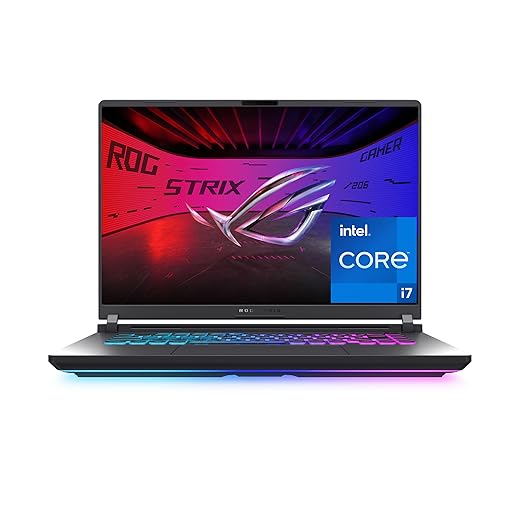
ASUS ROG Strix G16: buy the complete gaming package, not the RTX 5060 badge
02
Top choice for esports-ready gaming performance
At roughly $1,500, the Strix G16 belongs in the conversation only when its sale price is close to well-equipped RTX 5060 rivals. It targets players chasing high-refresh competitive play, sustained performance, and a more deliberately gaming-focused chassis—not shoppers merely looking for 1TB of storage.
The 16-inch 16:10, 165Hz/3ms screen, Core i7-14650HX, 16GB DDR5, and 1TB PCIe 4.0 SSD form a credible upper-midrange combination. Its appeal is the surrounding hardware: tri-fan cooling, an esports-oriented keyboard, and tool-free RAM/SSD access make it feel built for long sessions and later upgrades.
- 165Hz/3ms 16:10 panel suits fast competitive games
- Tri-fan cooling should better sustain demanding sessions
- Tool-free memory and SSD access eases upgrades
- Core i7-14650HX offers strong CPU headroom
- Wi-Fi 7 and 1TB Gen4 SSD feel current
- ~$1,500 is difficult to call cheap
- 16GB RAM is modest at this price
- RTX 5060 name alone does not establish a big lead
- FHD+ resolution is less sharp than QHD-class alternatives
Short take A well-rounded performance machine whose display, cooling, and serviceability can justify a sale premium. Without a meaningful discount, the specification is not automatically ahead of cheaper RTX 5060 configurations.
The Strix G16 earns its step-up status when the extra money buys consistent high-frame-rate play, a responsive panel, and cooling capable of holding performance through longer matches. The RTX 5060 should be judged by actual price and configuration, however; it is not a blank cheque for a large premium.
At a modest gap from a cheaper RTX 5060 model, its keyboard, thermal design, and upgrade access are worthwhile. At full price, 16GB memory and FHD+ resolution make rival deals harder to ignore.
Acer Nitro V: dependable 1080p gaming with 1TB built in
A balanced choice for mainstream gaming
The Nitro V pairs Intel’s Core i7-13620H with an RTX 4050, 16GB of DDR5 memory, and a 1TB Gen 4 SSD in a straightforward 15.6-inch package. Its 165Hz Full HD IPS screen makes most sense for players whose library leans toward competitive shooters, sports games, and well-optimized AAA titles.
This is the sensible middle ground for shoppers who want a laptop that feels properly gaming-ready today without paying for higher-end graphics hardware whose benefits are clearest at QHD resolution.
- RTX 4050 delivers strong 1080p esports performance
- 1TB Gen 4 SSD leaves room for a substantial game library
- 165Hz IPS panel suits high-frame-rate play
- Core i7-13620H handles gaming and everyday multitasking well
- DLSS can extend performance in supported games
- RTX 4050’s 6GB VRAM limits texture settings in some new AAA games
- Ray tracing often requires DLSS and reduced settings
- Native 1080p is the realistic target, not QHD gaming
- 16GB RAM is adequate but less generous than 32GB rivals
The Nitro V is a strong fit when reliable 1080p performance and a full 1TB SSD matter more than chasing premium visual settings. The RTX 4050 remains very capable in esports and many current games, especially with DLSS, but its 6GB of VRAM calls for sensible texture and ray-tracing choices in the most demanding newer releases.
Best for affordable creative workloads and gaming
The NIMO is a desk-first 17.3-inch machine for someone who values roomy game menus, split-screen work, and media playback more than a compact travel footprint. Its Ryzen 7 8745HS and Radeon 780M are an integrated-graphics pairing: suitable for esports and lighter games at sensible settings, rather than a substitute for the RTX-equipped laptops above. The large panel is only a real advantage once the exact listing confirms its refresh rate, brightness, color coverage, native resolution, and how well the chassis sustains performance under load.
- 17.3-inch screen suits desk use
- Ryzen 7 8745HS is strong for multitasking
- 16GB DDR5 and 1TB SSD included
- Radeon 780M handles lighter games
- USB4 can support capable docking
- Integrated graphics limits demanding AAA games
- Display refresh, brightness, and gamut need verification
- Large chassis is less travel-friendly
- Cooling performance is not established by the listing
Best for multitasking on a tight budget
At roughly $830, this 17.3-inch NIMO is a value-led choice for buyers who prioritize workspace, storage, and abundant memory over high-end frame rates. Its 45W Ryzen 5 6600H and 32GB of DDR5 are well suited to classwork, office multitasking, coding, and a crowded browser alongside video calls. The Radeon 660M is integrated graphics, however—not a discrete gaming GPU. That makes it a sensible fit for esports staples, indie games, and older AAA releases at restrained settings, rather than demanding new releases at native resolution. Before ordering, confirm the listed 32GB/1TB configuration, exact display resolution, and the seller’s return and warranty terms.
- 1TB SSD avoids immediate storage pressure
- 32GB DDR5 supports heavy everyday multitasking
- 17.3-inch chassis gives documents and games room
- Ryzen 5 6600H is stronger than typical low-power office chips
- Radeon 660M integrated graphics limit modern AAA settings
- Large display may reduce portability
- Display specifications need SKU-level confirmation
- Marketplace return and support terms deserve close reading
| Best match | Memory | Screen / carry balance | Gaming runway | ||
|---|---|---|---|---|---|
|
Acer Nitro V 16S AI Gaming Laptop
Ray tracing + upscaling
|
Ray tracing, DLSS | 32GB, excellent headroom | 16-inch, travel-friendly | 9.2/10 | View |
|
ASUS ROG Strix G16 RTX 5060 Laptop
Current AAA games
|
Current AAA | 16GB baseline | 16-inch, balanced | 8.9/10 | View |
|
Acer Nitro V RTX 4050 Gaming Laptop
Competitive 1080p
|
Esports 1080p | 16GB baseline | 15.6-inch, compact | 8.2/10 | View |
How much of 1TB is actually free?
A “1TB” SSD formats to roughly 931GB in Windows. After Windows 11, recovery partitions, drivers, and manufacturer utilities, many new gaming laptops begin with about 800–860GB free. Steam, Epic, Xbox, shader caches, screenshots, and large game patches steadily reduce that margin; keeping 10–15% empty also helps SSD performance and gives updates room to unpack.
Speed and upgrade paths
A PCIe 4.0 NVMe drive makes booting, level loading, and large installs feel brisk, but it rarely raises frame rates. Capacity and cooling matter more for a growing library than headline sequential-read figures.
A second M.2 slot is the cleanest expansion: add a compatible 2280 NVMe SSD without migrating Windows. If a laptop has one slot, replacement means cloning the original drive or reinstalling Windows. Before opening the chassis, confirm the manual’s slot size, whether a heatsink is needed, and local warranty rules; damage during an upgrade is not usually covered, even where upgrades themselves are allowed.
Do this before placing the order
-
Match the exact SKU
Confirm the listing—not the product-family page—states a 1TB SSD, the named GPU, RAM amount, and screen specification.
-
Fit the GPU to the game library
RTX 5060 models suit current AAA games and ray tracing; the RTX 4050 is a sensible 1080p choice. Radeon 780M and 660M machines are for lighter esports, indie, and older titles.
-
Protect the memory baseline
Treat 16GB as the minimum for modern gaming. Check whether RAM is upgradeable, especially on the Strix G16, and favor 32GB on the NIMO models for multitasking.
-
Inspect the panel and connections
Verify native resolution, refresh rate, brightness claims, USB-C display/charging support, HDMI version, Ethernet, and whether a second M.2 slot is actually present.
-
Calculate the real sale price
Compare delivered price after tax, shipping, coupons, and required memberships—not the crossed-out MSRP.
-
Read the return terms
Buy from a seller with a clear return window and check for restocking fees, dead-pixel rules, and warranty coverage.
- An RTX badge alone does not establish gaming value; wattage, display, memory, and price complete the picture.
The Acer Nitro V 16S AI is the strongest pick when the priority is long-lived AAA performance: its RTX 5060, 32GB memory, 1TB drive, and 180Hz display form the most complete specification. Choose the ASUS ROG Strix G16 RTX 5060 when its sale premium is small and better cooling, display quality, and upgrade access matter more than included RAM.
The Acer Nitro V RTX 4050 remains the value choice for high-refresh 1080p gaming. For a big, inexpensive desk display and modest game library, the NIMO Ryzen 7 is preferable to the Ryzen 5 version; the latter is only compelling at a steep discount. Buy the listed configuration, never the family name.