A low sticker price can become expensive the moment a project, compiler, and game all demand attention.
A laptop that posts impressive FPS in a review can still feel miserable at a desk by Monday. Game benchmarks often reward the GPU, but development work leans just as hard on memory capacity, CPU sustained power, storage speed, keyboard quality, and screen space. A 16GB machine may run today’s games well, yet fill rapidly with an IDE, browser tabs, containers, local databases, and a game engine.
The real budget is the price of staying productive. Favor a modern CPU with enough cooling to hold clocks during long builds, a 1TB SSD or an accessible second M.2 slot, and RAM that can reach 32GB. A capable RTX 4050-class GPU is useful, but not if it is paired with a dim display, soldered memory, or a chassis that throttles after ten minutes.
- Look for USB-C charging or DisplayPort support for an external monitor; it extends the machine’s useful workspace cheaply.
- A 120Hz panel is pleasant for games, but 300+ nits brightness and close-to-full sRGB coverage matter more for daily coding.
Match the laptop to the work
A gaming badge can obscure the more important question: what consumes time, memory, and compute during a normal week?
Coding-first work
For web development, backend services, scripting, databases, and most IDE-heavy work, prioritize a modern CPU, 16GB minimum with a path to 32GB, fast SSD storage, and quiet sustained cooling. An entry-level GPU—or integrated graphics—is usually enough; money is better spent on RAM, storage, or a sharper display.
Balanced programming and gaming
Developers who compile code, run containers, and play recent games benefit from a midrange RTX-class GPU. It delivers credible 1080p gaming while GPU acceleration remains available for creative tools and occasional CUDA work, without the price, heat, and battery penalties of top-tier graphics.
GPU-compute-focused work
Local machine learning training, CUDA development, 3D rendering, and simulation change the equation. Here, VRAM matters more than headline frame rates: 8GB is a practical floor, while 12GB or more avoids restrictive model and scene sizes. A stronger GPU is strategic only when those workloads are routine; otherwise, cloud compute is often the cheaper compromise.
Spend for the platform, not the sticker
An entry band of $600–$800 can work for lighter development and esports gaming, but only when it includes a recent CPU, 16GB RAM, and an accessible SSD slot. Deep discounts often hide 8GB soldered memory, a tiny 512GB drive, or an older processor—costly compromises that outlast the sale.
The $800–$1,100 sweet spot usually delivers the best balance: a modern H/HS-class CPU, RTX 4050- or RTX 4060-class graphics, two memory slots or a clear 32GB upgrade path, and better cooling. This is the range to target for containers, IDEs, local databases, and current games.
At $1,100–$1,400, pay extra only for durable gains: 32GB included, a 1TB SSD, stronger CPU, brighter display, or a higher-power GPU. A lasting rule: choose the newest platform with expandable memory and storage before chasing a discounted higher-tier GPU.
A credible baseline at a glance
Look for a recent Ryzen 5/7 H- or HS-series chip or Intel Core i5/i7 H-series equivalent. These have enough sustained multicore headroom for builds, containers, and a game running after work.
Two memory channels raise bandwidth for the CPU and integrated graphics, while 16GB prevents routine IDE, browser, Docker, and game workloads from fighting over memory. Confirm whether a second SODIMM slot remains for 32GB later.
A 512GB NVMe SSD leaves room for toolchains, projects, and several large games. An RTX 4050 or Radeon RX 7600S-class GPU is a sensible floor for modern 1080p gaming; lower tiers can still suit lighter esports titles.
A 120Hz or 144Hz 1080p IPS-class panel makes games feel responsive and keeps text comfortable for long sessions. More importantly, check reviews for sustained CPU/GPU wattage and noise: thin chassis often lose performance after the first few minutes.
A laptop with the same CPU and GPU can perform very differently from another model. Cooling and power limits determine whether boost clocks survive a long compile or game session.
Retailer pages rarely state this clearly. Independent reviews that report sustained wattage, temperatures, fan behavior, and memory layout are more revealing than a short peak benchmark.
The GPU name is only the start
An RTX 4050 or 4060 badge does not guarantee equal results. Manufacturers set different GPU power limits: a well-cooled 100W model can materially outperform a thin 45W version carrying the same name. Check the review’s sustained clocks and noise figures, not only the specification sheet.
A MUX switch or Advanced Optimus lets games bypass the integrated GPU, improving frame rates and reducing latency; it also makes an external display less necessary for full performance. Dual-channel system RAM matters too: one 16GB stick can hold back both games and compile-heavy multitasking.
For graphics, 6GB VRAM remains workable for esports, older AAA games, and modest CUDA experiments. 8GB is the safer floor for current textures, local image-generation workflows, and longer ownership. NVIDIA’s CUDA ecosystem still has the broadest support in PyTorch, TensorFlow, and many developer tools. AMD laptops can offer excellent gaming value, but verify ROCm support for the intended OS and libraries before treating them as a local-compute substitute.
Record the GPU wattage, MUX status, RAM layout, and VRAM before comparing prices. Two “RTX 4060” listings may be meaningfully different machines.
The workday matters as much as frame rates
A gaming laptop earns its place beyond benchmarks when its everyday ergonomics hold up. A firm keyboard with full-size arrows, sensible key spacing, and low flex matters during long editing sessions; RGB lighting is secondary. For making a gaming laptop work for professional tasks, a 16:10 display is especially valuable: the extra vertical pixels show more code, terminal output, or documentation. Aim for 300 nits or more and good sRGB coverage; avoid dim 144Hz panels if work often happens away from a desk.
Ports determine whether the machine remains flexible. USB-C with DisplayPort and Power Delivery, HDMI, several USB-A ports, and Wi-Fi 6E make docks, drives, and external monitors painless. Confirm whether USB-C charging supports useful wattage: it is ideal for light coding and travel, while the supplied brick is still needed for compiling or gaming.
Keep heat and Linux in check
A performance profile with quiet or balanced modes prevents fans from dominating meetings. Linux buyers should verify the exact Wi-Fi chip, suspend behavior, hybrid-graphics support, and available BIOS updates; NVIDIA systems work well, but driver setup and external-display routing deserve checking first.
Upgrade paths keep the bargain useful
An inexpensive gaming laptop stays useful only if its memory and storage can grow with the workload. Soldered 16GB RAM is adequate for an editor, browser, and a game; containers, language servers, and a local database can make it feel cramped quickly. Prefer two accessible SODIMM slots, or at least one free slot beside a replaceable module. That turns a 32GB upgrade into a modest expense rather than a reason to replace the machine.
Storage pressure is less visible but just as real. Docker images, SDKs, package caches, VM disks, source trees, and a game library can consume a 512GB drive surprisingly fast. 512GB is workable when projects live selectively and external storage is used; 1TB is comfortable for mixed development and gaming. A second M.2 slot is ideal, since it adds capacity without reinstalling the operating system. Check current 1TB SSD choices suited to development work before assuming every model has that spare slot.
For the coding-first student
A sensible starting point is a recent six-core Ryzen 5 or Core i5, paired with 16GB RAM and a 512GB NVMe SSD. That combination keeps an IDE, browser research, Docker containers, and a local database moving without constant memory pressure.
Integrated Radeon or Intel graphics are a fair compromise when coursework and lighter esports games matter more than new AAA releases. They are not a substitute for an RTX laptop for demanding games, CUDA projects, or serious local AI work.
Walk away from machines with:
- 8GB soldered memory and no documented upgrade path
- 256GB storage as the only drive
- Vague CPU generation, RAM-slot, or warranty information
- Claims of “gaming” performance without a dedicated GPU
A low price is worthwhile only when the specifications can be verified before purchase.

At roughly $500, this Ryzen 5 7430U model shows what coding-first value looks like. Its six cores, 16GB RAM, and 512GB SSD suit coursework and everyday development.
Radeon integrated graphics handle light games, not modern graphics-heavy titles. The listing mentions memory and SSD expansion, but its RAM wording conflicts. Confirm the installed memory, accessible slots, and return policy before ordering.
The balanced developer-gamer
For regular compilation, Docker or WSL2 containers, and modern 1080p gaming, the sensible target is a Ryzen 7 7840HS/8845HS or Core i7-13620H/14650HX-class processor, 16GB dual-channel RAM with a real route to 32GB, and an RTX 4050 or 4060.
An RTX 4050 is the value choice when it runs at roughly 90W or more; DLSS 3 helps demanding games, though its 6GB VRAM can constrain high-texture settings and local AI work. An RTX 4060’s 8GB VRAM is worth a modest premium, but not a large one if it means accepting soldered memory, a dim screen, or poor cooling.
Worthwhile compromises include a plastic chassis, average speakers, and a 512GB SSD only when a second M.2 slot is available. Avoid trading away RAM capacity or display quality: a 144Hz 1080p IPS panel should reach about 300 nits and cover close to full sRGB.
Before ordering, verify the exact retail configuration—CPU suffix, GPU TGP, panel specification, populated and free memory slots, and current price. Model names often conceal meaningful downgrades.
When CUDA and assets need headroom
An 8GB NVIDIA GPU is the practical floor for CUDA coursework, Unreal scenes, Blender assets, and local inference experiments. It will not make every model fit locally, but it avoids the immediate memory pressure of 6GB parts when textures, geometry, or batch sizes grow.
NVIDIA remains the simpler route for CUDA-dependent classes because course code, PyTorch builds, and profiling tools commonly target its software stack. Game development also benefits from DLSS and broad engine support, though shader compilation and editor responsiveness still lean heavily on CPU cooling and system RAM.
Verify the exact configuration before ordering:
- Confirm 8GB GDDR6, not a similarly named lower-tier GPU.
- Check the GPU power limit and independent cooling reviews.
- Confirm installed RAM, SSD capacity, and return terms on modified listings.
- Budget for 32GB RAM if Unreal, Docker, or several tools run together.
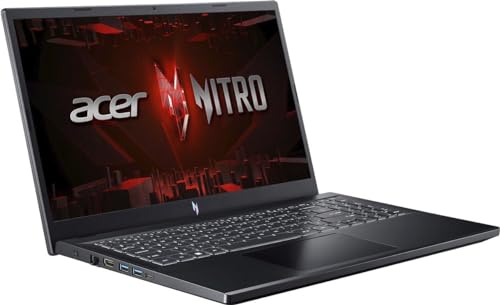
This listing pairs an RTX 4060 with 8GB VRAM and an i7-13620H. Its 144Hz 1080p screen suits game testing and everyday coursework.
The seller lists upgraded 16GB DDR5 memory and a 512GB NVMe SSD. Confirm the upgrade warranty and GPU power limit before purchase.
- Graphics
- GeForce RTX 4060
- VRAM
- 8GB GDDR6
- Processor
- Core i7-13620H
- Listed memory
- 16GB DDR5
Choose the laptop that survives campus
A gaming laptop for college coursework spends more time in backpacks, libraries, and lecture halls than on a desk. Check charger mass as carefully as laptop mass: a 1 kg power brick makes a nominally portable machine tiresome.
Prioritize the everyday
A quiet or silent profile prevents fan bursts from becoming a classroom distraction. For coding, a 70 Wh-plus battery and USB-C Power Delivery are often worth more than a slight GPU step-up; a compact 100 W GaN charger can cover lectures, though demanding gaming still needs the original adapter.
A 300-nit-or-brighter, preferably 16:10 display remains legible near windows. Finally, favor brands with nearby authorized service and clear warranty terms—repairs during term time matter.
Before the checkout timer ends
-
Open the full specification sheet
Confirm the exact CPU, RAM layout, SSD size, GPU wattage, display, and port list; sale pages often group weaker variants under the same model name.
-
Reject a false bargain
Skip 8GB RAM, soldered memory with no 32GB path, a 256GB-only drive, or an underpowered GPU configuration.
-
Price the finished machine
Include the cost of a 32GB RAM kit or second SSD where needed, rather than comparing sticker prices alone.
-
Buy for the next projects
A little thermal, memory, and storage headroom keeps containers, IDEs, games, and local tools comfortable for the next two to three years.
The best deal is the one that stays useful
- Treat the retailer’s specification table—not the headline discount—as the deciding evidence.
- Favor upgradeable memory and storage over a marginally cheaper, closed-off configuration.
A gaming laptop earns its bargain status only when its exact configuration meets the development baseline and has room to grow. Verify the details, then compare the survivors—not the sale banners.