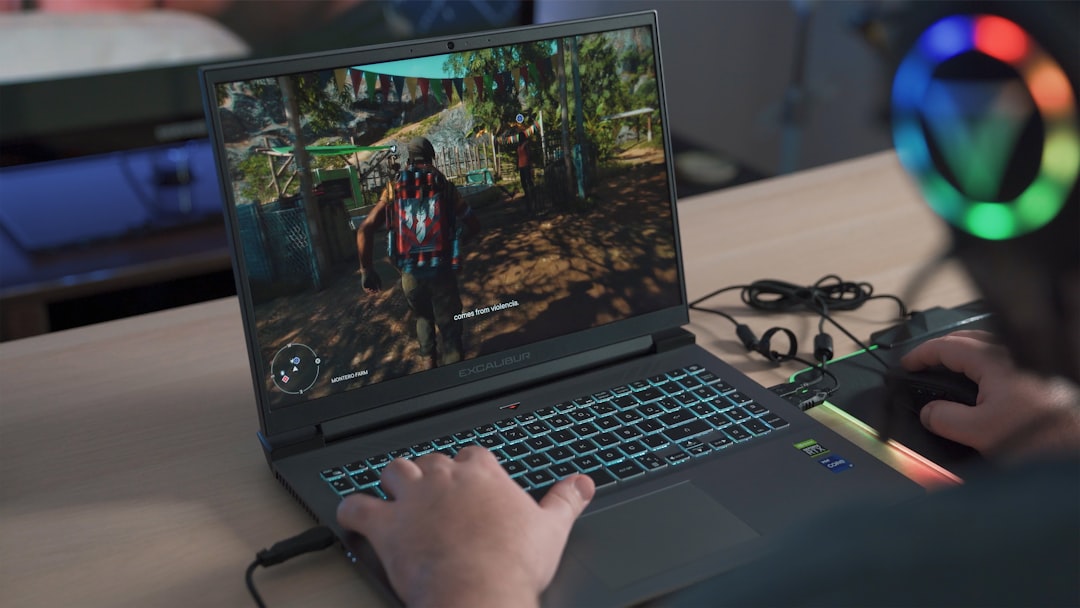
A low price only counts as a win if the games actually run well.
A student spots a “gaming laptop” on sale, imagines smooth matches after class, then discovers that the machine can barely hold a steady frame rate in the games that prompted the purchase. That is the budget trap: colourful lighting, aggressive labels, and a tempting discount can hide an underpowered graphics chip, too little memory, or storage that fills almost immediately.
A first laptop often has to do double duty—notes, video calls, browser tabs, streaming, and games—so the cheapest option is rarely the most economical. What matters is whether its GPU, processor, RAM, cooling, and screen suit the specific games in rotation, not whether the word “gaming” appears on the lid. A modest, well-balanced model can be far more satisfying than a flashy bargain that forces every setting to Low on day one.
- Game requirements matter more than marketing badges.
- A dedicated GPU is not automatically powerful; its exact model and power limit determine much of its performance.
Start with the games on the list
A “gaming laptop” is only a good fit if it suits the games actually played. A machine that feels excellent in Valorant or Hades can struggle badly in Cyberpunk 2077, Alan Wake 2, or a heavily modded Skyrim install.
Different libraries stress different parts
- Esports and lighter indies usually run well at 1080p on modest graphics hardware. Prioritise a responsive screen and stable frame rates; 120 fps is useful in competitive games only when the display can show it.
- Modern AAA games need the strongest dedicated GPU available in the budget, ideally with 6 GB or more of VRAM. Aim for 1080p at medium settings with roughly 45–60 fps, using DLSS, FSR, or XeSS when available.
- Simulators, strategy games, and modded titles can lean heavily on the processor and system memory. Cities: Skylines II, large Total War battles, Minecraft shader packs, and mod lists benefit from a capable CPU and 16 GB RAM more than an ultra-fast panel.
“Max settings” is a poor buying target at this price. Presets can hide costly features such as ray tracing, high-resolution textures, and extreme shadow quality, often for a small visual gain. Consistent 1080p performance at sensible settings produces a better experience than occasional high-detail screenshots followed by stutter.
Use the most demanding game likely to be played as the benchmark. Look for tests of the exact GPU and wattage, then expect lower results in thin laptops or games with heavy mods.
Spend on graphics power first
For a beginner buying a gaming laptop, the GPU deserves the largest share of the budget. It has the greatest effect on frame rate, image quality, ray tracing, and how long the machine remains comfortable with new AAA releases. A stronger graphics chip is usually more valuable than a small jump in processor tier or an oversized SSD.
But the name on the GPU is not the whole specification. An RTX 4050, for example, can perform very differently across laptops because manufacturers set different graphics power limits (often listed as TGP or Maximum Graphics Power). A higher-wattage version can sustain substantially better clocks than a thin chassis limited to preserve battery life and temperatures. The screen resolution matters too: the same GPU has an easier time delivering smooth play at 1080p than at 1600p.
Cooling determines whether that advertised performance lasts. Look for reviews that report sustained game benchmarks, noise, and temperatures—not only a store-page chip list. Two fans, generous exhausts, and a thicker body are often practical advantages, not cosmetic compromises. Comparisons of budget RTX 4050 laptop configurations are especially useful because wattage and cooling vary so widely.
A MUX switch or Advanced Optimus is also worthwhile. It lets the display use the dedicated GPU directly, avoiding some performance loss from routing frames through integrated graphics. It is a welcome feature, though still secondary to buying the best well-cooled GPU the budget permits.
Choose a sensible CPU, not the priciest one
A current midrange CPU—such as a Ryzen 5 or Core i5-class H-series model with six or more modern performance cores—is the balanced partner for a budget gaming GPU. At 1080p, most graphically demanding games are GPU-limited, so paying heavily for a flagship CPU rarely produces a proportional frame-rate gain.
More processor headroom matters for specific workloads:
- CPU-heavy strategy and simulation games with large late-game saves
- Competitive titles targeting very high-refresh-rate screens
- Modded sandbox games, especially with large draw distances or busy servers
- Streaming, video editing, compiling code, or running virtual machines alongside games
For ordinary single-player gaming, prioritize the stronger GPU, 16 GB of dual-channel RAM, and adequate cooling before stepping up from a capable midrange processor. A premium CPU makes sense when one of those demanding uses is central to the laptop’s job—not merely because its model number sounds faster.
Buy the supporting hardware, not just the GPU
A laptop with a capable GPU can still feel cheap if it opens games slowly, stutters while a browser is open, or ships with a dim, blurred screen. These parts are not glamorous specifications; they shape every session.
Memory and storage
16GB of RAM is the sensible starting point for a new gaming laptop. Modern games, launchers, voice chat, browsers, and Windows can readily fill 8GB, causing hitching and aggressive background-app reloads. That is why 16GB of RAM matters, especially for modded games and simulation titles.
An 8GB model is only defensible when it is substantially cheaper and has two accessible memory slots, with one empty slot or replaceable modules. Some thin budget machines solder all memory to the motherboard; an attractive entry price then becomes a permanent limitation. Before purchase, confirm the maximum supported RAM and whether opening the base affects warranty terms.
Storage should be a 512GB NVMe SSD minimum. A 256GB drive can be nearly half full after Windows, updates, and two or three large games. Prefer a second M.2 slot for later expansion; replacing a single small drive means reinstalling the operating system or cloning it.
Match the panel to the graphics chip
For most budget GPUs, a 1920×1080, 144Hz or 165Hz IPS-level panel is the practical sweet spot. It lets the GPU pursue smooth frame rates rather than struggling to drive a 1440p panel at reduced settings. A 120Hz screen is acceptable, but check that it is not a low-quality 45% NTSC panel marketed only by refresh rate.
Look for at least 250–300 nits brightness and roughly 100% sRGB color coverage when possible. These make indoor use, films, and ordinary work noticeably better. Finally, seek published response-time testing: a slow panel can smear moving detail even when the game reports 144 fps. A fast GPU deserves a screen that can actually show its work.
A low price can hide a short lifespan
Prioritize 16GB RAM, a 512GB SSD, and a 1080p high-refresh display before paying extra for a minor CPU upgrade.
The details that decide whether it stays enjoyable
-
Cooling under a real gaming session
Thin budget chassis can post impressive short benchmarks, then reduce CPU and GPU power after 20–30 minutes. Reviews with sustained game tests reveal whether frame rates hold and whether the keyboard deck becomes unpleasantly hot.
PreferStable performance, sensible surface temperatures, and fan profiles that do not run at full pitch constantly.Be wary ofPerformance claims based only on brief benchmark runs or a silent listing about noise. -
Charger, battery, and the travelling compromise
Gaming performance normally requires the supplied charger; battery mode often limits GPU power sharply. A 180–240 W power brick can add substantial weight, while a large battery may still deliver only several hours of light work.
PreferUSB-C charging for everyday travel, a manageable brick, and battery-life tests for browsing or video.Be wary ofExpecting full gaming speed away from a wall socket or judging portability by laptop weight alone. -
Keyboard, ports, and wireless reliability
A comfortable keyboard matters every day, while port placement can make a desk setup tidy or irritating. Wi-Fi 6/6E, Bluetooth stability, Ethernet, and an external-display port wired to the dedicated GPU are practical advantages.
PreferA firm keyboard, enough USB ports, rear or side charging that suits the desk, and confirmed display-output routing.Be wary ofA port list without layout details, or assuming every USB-C port supports charging and video. -
Support and upgrade access
Budget models vary greatly in RAM/SSD access, replacement parts, and warranty service. A removable bottom panel and clear warranty terms can matter more after the first year than cosmetic extras.
PreferAccessible storage and memory slots, local service coverage, and reputable long-term owner reports.Be wary ofSoldered memory without adequate capacity or vague marketplace-only warranty promises.
Manufacturers often reuse one chassis with different screens, batteries, Wi-Fi cards, GPU power limits, and memory layouts. The retailer’s SKU should match a detailed review or the maker’s specification sheet.
If that match cannot be made, treat battery life, display quality, upgradeability, and even GPU performance as unconfirmed rather than assumed.
Read the price tag like a spec sheet
At the lowest end of the market, under $700 usually means a compromise: an older GPU, 8 GB of memory, a small SSD, or a dim display. Around $700–$900, the useful target is a balanced 1080p machine with 16 GB RAM and an RTX 4050-class GPU when promotions align. Above that, paying more is most worthwhile for a meaningfully faster GPU, better cooling, or a brighter, faster screen—not a slightly newer processor.
Sale badges deserve a pause. Compare the exact CPU, GPU, RAM, storage, display refresh rate, and GPU power limit against the regular model; retailers often discount a cut-down configuration with 512 GB storage or single-channel 8 GB RAM. A second NVMe slot and accessible memory make a modest drive less concerning, since storage is usually the easiest upgrade.
An open-box laptop can be excellent value if its return window and warranty are clear. Inspect the panel for dead pixels, test every port and keyboard key, confirm the charger is included, and check battery health before the return period closes.
Capacity and expansion matter more than headline SSD speed for most games.
A full 512 GB drive quickly becomes restrictive; game loading gains from premium SSDs are usually modest.
RTX names cover a wide performance range.
An RTX 3050 and a higher-wattage RTX 4050 differ sharply; VRAM, wattage, and cooling still set the result.
Returned units can offer substantial savings with buyer protection.
Condition grading varies, so a reputable seller and a usable return policy are essential.
A five-minute routine that prevents expensive mistakes
-
Name the games and the target
List the three most demanding games likely to be played, then look for independent benchmarks at 1080p. A steady 60 fps at sensible High or Medium settings is a stronger result than an impressive specification with no tested results.
-
Confirm the exact sale configuration
Match the retailer’s model number against the maker’s support page. Verify GPU name and power limit where published, RAM capacity and slot access, SSD size, screen resolution, and refresh rate; one altered component can turn a good deal into a compromised one.
-
Check the compromises that cannot be fixed
Read reviews for heat, fan behaviour, display response, brightness, battery life, and keyboard comfort. Memory and storage can often be expanded later; a dim, slow panel or poor cooling generally remains.
-
Price the complete purchase
Include tax, warranty terms, delivery, and any immediate RAM or SSD upgrade. Compare the final total with nearby alternatives, not the temporary discount percentage or a misleading crossed-out price.
-
Buy when the balance is right
A legitimate sale is worth taking when it meets the game target, has 16 GB of RAM or a clear upgrade path, adequate SSD capacity, and no deal-breaking review finding. Chasing the next small specification improvement can outlast the sale—and the enjoyment of playing now.
For open-box machines, add a return-window test: inspect the chassis, battery report, display pixels, ports, Wi-Fi, and a short gaming load before the deadline.
- Treat model numbers as evidence: retailers often sell several materially different versions under one laptop name.
- Prioritize permanent qualities—cooling, screen, and build—over upgrades that can be added later.
The strongest beginner purchase is rarely the cheapest laptop or the one with the longest specification list. It is the verified configuration that delivers dependable 1080p gaming today, leaves room for a memory or storage upgrade, and avoids a screen, cooling, or warranty compromise that will be felt every day.
Once that threshold is met, buying with confidence is better than waiting indefinitely for a flawless deal. Games, not marketing labels, remain the useful yardstick.