At this price, the spec sheet matters far more than the badge on the lid.
A $479 listing can call itself a gaming laptop while relying on integrated graphics that struggle with a new blockbuster at 1080p. That does not make it useless; it changes the sensible game library. Think League of Legends, Valorant, Minecraft, Roblox, indie games, emulation, and older AAA titles—usually with modest settings and, where available, upscaling.
The crucial detail is the graphics chip, not just 16GB of RAM or a fast-sounding processor name. Dedicated GPU? That is rare below $500 and worth verifying. Integrated Radeon or Intel graphics can be perfectly capable, but performance depends on the exact CPU generation, dual-channel memory, cooling, and power limits. A Full HD screen also asks more of the hardware than 720p, so lowering resolution is often the difference between choppy and playable.
- Confirm the exact CPU model and GPU; vague “Core” or “gaming” descriptions reveal little.
- Prioritize 16GB dual-channel RAM and an SSD; neither substitutes for stronger graphics.
- Treat 24GB RAM as a multitasking benefit, not a guarantee of higher frame rates.
Pick the Right Compromise



What “playable” really means
For these laptops, playable does not mean every new blockbuster at 1080p High. It means smooth, responsive results in the games their hardware is suited to.
Esports staples such as League of Legends, Valorant, Rocket League, and Minecraft are the best fit, often reaching fluid frame rates with sensible settings. 2D games and indies—including Hades, Stardew Valley, and Hollow Knight—should be largely trouble-free. Older AAA releases can also work well, but usually at Low settings rather than visual-showcase presets.
Settings that matter
- Drop render resolution to 900p or 720p when 1080p stutters.
- Start on Low, then raise textures only if video memory allows.
- Use FSR or in-game upscaling where available; it can recover useful performance.
- Cap demanding games at 30 or 40 fps for steadier frame times.
- Play plugged in with the laptop set to its Performance power mode.
Cloud gaming broadens the catalog dramatically with a stable, low-latency connection. By contrast, recent demanding releases with heavy ray tracing or high VRAM needs remain poor local-play candidates.
A stable 30–40 fps at reduced settings generally feels better than a fluctuating 60 fps. Disable ray tracing first; it is especially punishing on integrated graphics.
These picks were judged by the silicon beneath the sticker price, not by “gaming” labels. CPU generation and integrated-GPU architecture set the performance ceiling; memory layout determines how much of it the graphics can actually use.
A modern Ryzen APU with fast dual-channel RAM can outperform a newer-looking budget Intel system with weaker integrated graphics. That distinction explains the compromises that come with the lowest prices.
Capacity matters, but two matched memory modules matter more than a single large stick. SSD size and a 1080p panel improve daily use; cooling, USB-C/video output, Wi-Fi, and replaceable RAM or storage determine whether the laptop remains useful.
Marketplace listings often mix processor generations, screen types, RAM layouts, and return terms under one title. Confirm the CPU model, graphics, memory slots, storage, charger, warranty, and return window with the actual seller before ordering.
Specifications and protections can vary by seller, even for identically named models.
NIMO Ryzen 5 6600H: the balanced pick—if the configuration matches
01
Best for stronger gaming and multitasking performance
This renewed NIMO is the strongest all-round candidate at roughly $450 only when the listing and delivered unit both confirm Ryzen 5 6600H and Radeon 660M graphics. That Rembrandt-era 6-core chip is meaningfully more capable than the low-watt U-series processors common at this price.
Its 16GB of DDR5 matters beyond benchmark charts: browser tabs, Discord, launchers, schoolwork, and a game can coexist with fewer stutters from memory pressure. It suits players who want one inexpensive Windows machine rather than a console-like gaming-only device.
- Ryzen 5 6600H has six modern Zen 3+ cores
- 16GB DDR5 supports smoother multitasking
- Radeon 660M is credible for esports and lighter games
- RAM and SSD are listed as upgradeable
- Integrated graphics still limit recent AAA games
- Panel specifications do not promise high brightness or color accuracy
- Renewed condition and exact parts require seller verification
- 512GB fills quickly with modern game installs
Quick take With the confirmed 6600H/660M combination, this is the most rounded sub-$500 option. It should be treated as a 720p–1080p low-settings machine, not a replacement for a laptop with a discrete GPU.
The NIMO earns the lead because its CPU, Radeon 660M iGPU, and 16GB DDR5 form a notably balanced budget platform. Confirm those exact components before ordering: marketplace listings can combine variants or reuse generic specifications.
Expect responsive general use and satisfying esports performance with sensible settings. The 15.6-inch IPS screen is functional rather than a display-buying reason, and demanding new AAA games will need low presets, reduced resolution, or may simply be a poor fit.
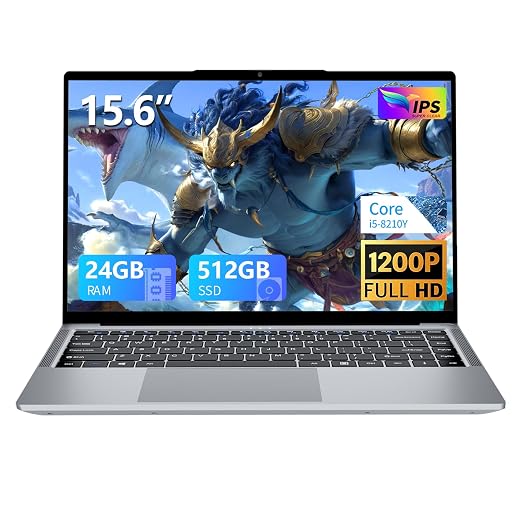
15.6-Inch FHD Laptop: abundant RAM, modest game ambitions
Best for multitasking on a tight budget
At roughly $350, this 15.6-inch Windows 11 Pro laptop is best treated as a school-and-work machine that can also run lightweight PC games. Its unusual 24GB RAM and 512GB SSD leave comfortable room for research tabs, Office files, video calls, and background apps without making every task compete for memory.
That capacity should not be mistaken for gaming horsepower. The i5-8210Y is a low-power chip with integrated Intel graphics, not a modern gaming APU or a discrete GPU. Frame rates depend far more on the graphics architecture and its access to system memory than on the total RAM figure. Integrated graphics borrow RAM, so memory bandwidth matters; a matched dual-channel setup can help, while an uneven 24GB configuration may run partly in slower single-channel mode. Because the listing does not specify RAM speed or channel layout, buyers should confirm both before expecting more than older, indie, or undemanding esports games at reduced settings.
- 24GB RAM suits tab-heavy study and remote-work days
- 512GB SSD provides useful room for applications and game libraries
- 15.6-inch 1080p anti-glare display is practical for documents and calls
- Low asking price leaves little budget wasted on inflated gaming branding
- i5-8210Y integrated graphics are far behind newer Radeon 660M-class APUs
- 24GB capacity does not guarantee high memory bandwidth for the iGPU
- RAM speed and dual-channel configuration are not disclosed
- Modern demanding games will require major compromises or may be unsuitable
Core laptop for coursework first, lighter games second
A practical choice for students and commuters
At roughly $310, this 15.6-inch Full HD laptop is better viewed as a campus-and-commute machine that happens to accommodate a modest game library. Its 16GB of RAM, 512GB SSD, anti-glare 1920×1080 display, and privacy camera make more sense for documents, browser-heavy classes, video calls, and media than for demanding 3D releases.
The listing’s “Core processor” label is not enough to predict frame rates. A recent Core i3 or i5 with capable integrated graphics is a very different proposition from an older low-power Core part, despite the similar branding. Before buying, the seller should provide the full CPU model number and return terms. Until then, sensible targets are lightweight games such as Stardew Valley, Terraria, Vampire Survivors, and Hades; performance in 3D esports titles should not be assumed from the word “gaming.”
- 16GB RAM supports classwork and multitasking
- 512GB SSD leaves room for files and smaller games
- Full HD anti-glare screen suits everyday viewing
- Low asking price for the stated memory and storage
- Exact Core generation and model are not disclosed
- Integrated graphics limit modern 3D gaming
- “Gaming” branding does not establish game performance
- 38Wh battery is modest for long unplugged days
N95 starter for the smallest budgets
Best for casual gaming and everyday tasks
At roughly $310, this 15.6-inch N95 laptop is the low-cost option for someone who needs one Windows machine for classwork, streaming, browsing, and occasional games. Its 16GB RAM and 512GB SSD make it feel more capable in everyday use than many bargain models, while the 3.5-pound chassis keeps it easy to carry.
- 16GB RAM helps Windows and background apps stay responsive
- 512GB SSD leaves practical room for games and files
- Very low entry price for a full-size Windows laptop
- Light 3.5-pound build
- Intel N95 integrated graphics are far below modern gaming APUs
- Newer demanding games will need very low settings or may not run well
- 720p or lower resolution is often the sensible target
- Listing does not establish memory channels or detailed graphics specifications
The short version The 16GB configuration prevents RAM from being the immediate bottleneck, but it cannot transform the N95’s entry-level integrated graphics. Treat low resolution, low presets, and modest frame-rate targets as the normal operating mode—not an occasional compromise.
This is a basic laptop that can play some games, not a gaming laptop in the performance sense. It is a defensible choice when price matters more than visuals: lighter esports titles, indies, and older releases are the realistic library. For modern 3D games, the Ryzen 6600H option is in a different league whenever the extra money is available.
| Best fit | Graphics | Memory / storage | Game outlook | Sale price | ||
|---|---|---|---|---|---|---|
|
NIMO Ryzen 5 Gaming Laptop With 16GB
Gaming balance
|
Gaming balance | Radeon 660M iGPU | 16GB DDR5 / 512GB | Best of this group | – | See deal |
|
15.6-Inch FHD Laptop With 24GB RAM
Multitasking
|
Heavy multitasking | Integrated, unspecified | 24GB / 512GB | Light games only | – | See deal |
|
Core Processor Laptop With FHD Display
School use
|
Coursework and travel | Integrated, unspecified | 16GB / 512GB | Light games only | – | See deal |
Five details worth verifying
-
Name the processor and graphics
Ask for the exact CPU suffix and GPU, not “Core” or “Ryzen.” A 6600H with Radeon 660M is a materially different machine from an N95.
-
Check memory channels, not just capacity
Two matched RAM sticks give an integrated GPU far more bandwidth than a single 16GB or 24GB module.
-
Inspect the SSD and charger
Confirm usable SSD space, an M.2 upgrade slot, and that the correct wattage charger is included; weak replacements can trigger power limits.
-
Treat display and Windows claims literally
“FHD” says nothing about brightness or color, and “Windows installed” is not proof of an activated, legitimate license.
-
Compare used business-class hardware
A refurbished-versus-new price comparison can uncover faster CPUs or dedicated graphics, but battery health, warranty, and return terms matter.
Request screenshots of Device Manager, RAM details, and Windows activation before ordering.
The deal has to survive delivery
At this price, a vague listing can cost more than a slower laptop. Prefer sellers with recent detailed feedback, a stated model number, charger photos, and a 30-day return window. The reliability of very cheap gaming laptops often hinges on support after delivery; marketplace protection may exclude battery wear or shipping damage.
Expect plastic hinges, modest cooling, and batteries that fade quickly. Walk away if specifications conflict, returns are final-sale, or the price is implausibly low.
A verified older laptop with returns is usually safer than an unknown “new” machine with no meaningful support.
Buy the NIMO—or save for real graphics
- Choose the NIMO Ryzen 5 6600H only after confirming Radeon 660M and 16GB dual-channel DDR5.
- Use cloud gaming for newer, demanding titles when the connection is stable and latency is low.
- Skip RAM-heavy listings with vague processors; wait for a verified discrete GPU if modern AAA games are the goal.
The NIMO Ryzen 5 6600H is the clear local-gaming choice for esports, indies, and older games at sensible settings. The 24GB model is better for multitasking, while the Core and N95 machines fit schoolwork and very light play.
For recent AAA releases, cloud gaming is the practical stopgap; otherwise, saving for a stronger graphics tier is the smarter purchase.