A 120 Hz label is only useful when the monitor accepts the PS5’s 120 Hz signal.
A new monitor arrives, the PS5 is set to Performance Mode, and the game still reports 60 Hz. The usual culprit is not the console: it is the display’s accepted input timing. A panel may refresh at 120, 165, or 240 Hz while accepting 120 Hz only at certain resolutions, only through one port, or not from a PS5 at all.
For console play, the meaningful specification is explicit support for 1920×1080 at 120 Hz and/or 3840×2160 at 120 Hz over HDMI. HDMI 2.1 is required for uncompressed 4K/120, but it is not automatically necessary for 1080p/120 or 1440p/120. Check the monitor manual—not merely its headline refresh rate—and use the PS5’s Test 120 Hz Output setting after enabling Performance Mode.
- PS5 can output 1440p at 120 Hz, provided the monitor accepts that HDMI timing.
- A supplied or certified Ultra High Speed HDMI cable is needed for 4K/120.
Three PS5 monitor matches worth checking


A 120 Hz screen does not guarantee 120 fps
A 120 Hz monitor gives the PS5 somewhere to send up to 120 frames per second; it does not make every game render that many frames. Games must include a 120 Hz mode, and it commonly sits behind Performance, High Frame Rate, or 120 Hz settings. That mode may reduce internal resolution, ray tracing, shadows, foliage, or image quality to sustain the higher frame rate.
Resolution changes the bandwidth picture
- 1080p120 is the easiest target and works over HDMI 2.0 bandwidth.
- 1440p120 is a sharp, sensible middle ground; PS5 supports 1440p output, but the particular game still needs a 120 fps mode.
- 4K120 delivers the most detail and requires an HDMI 2.1 path from console to display. It is usually the most demanding performance option, so many titles use dynamic resolution or visual compromises.
For reliable detection, set PS5 Settings > Screen and Video > Video Output > 120 Hz Output to Automatic, and select Performance Mode under Saved Data and Game/App Settings > Game Presets. Resolution should normally remain Automatic. A 60 Hz result can also stem from the game’s Quality mode, an HDMI port with limited bandwidth, or a cable/monitor setting—common reasons a monitor appears limited to 60 Hz.
Read the input table, not the badge
A monitor can carry an HDMI 2.1 label yet still be a poor 4K120 match. The useful evidence is its manual, support page, or tested specification table: look for 3840 × 2160 at 120 Hz over HDMI, then check whether that timing applies to every HDMI input or only one.
Port sharing matters. Some displays offer one full-bandwidth port beside a lower-bandwidth HDMI port; others reserve their best gaming specifications for DisplayPort. A listed 240 Hz mode often describes a PC connection at 1080p or 1440p, not an HDMI mode the PS5 can use. DisplayPort features do not transfer to the console.
Check the complete 120 Hz path
At 4K120, confirm that the same HDMI port supports:
- HDR at 120 Hz, rather than HDR only at 60 Hz
- VRR over HDMI, ideally across the PS5’s working range
- the desired color format without an unexpected bandwidth compromise
- console testing or explicit PS5 support, where available
The Amzfast is the logical model to scrutinize for a documented 4K120 HDMI path. The INNOCN’s 240 Hz headline is more relevant to a PC at QHD, while the SANSUI’s value case depends on accepting its stated HDMI limits.
Connect the PS5 to the intended HDMI port, enable 120 Hz Output and VRR in the console settings, then open Video Output Information. It shows the active resolution, refresh rate, HDR status, and VRR state—far more useful than the monitor’s front-box claims.
Match the panel to the PS5 experience
-
Native resolution and screen role
A 32-inch 4K display gives single-player worlds, films, and fine UI detail more room to breathe. A 24.5-inch QHD IPS screen is often the sharper competitive choice at a desk, where its smaller image demands less eye travel.
Look for4K for immersive sofa or media use; compact QHD IPS for close-range competitive play.AvoidBuying 4K solely for speed, or a small QHD panel for a distant viewing position. -
Confirmed console modes
The specification should explicitly state PS5 or HDMI support for 3840 × 2160 at 120 Hz, or 2560 × 1440 at 120 Hz. Also verify whether HDR and VRR remain available in that mode, rather than assuming every HDMI 2.1 feature works together.
Look forPer-port wording that lists resolution, 120 Hz, HDR, and VRR together.Avoid“120 Hz” claims that refer only to DisplayPort or an overclocked PC mode. -
Motion, latency, and HDR
Low input lag at 120 Hz matters more than a headline response-time figure; poor overdrive can create inverse ghosting. HDR needs meaningful brightness and contrast to add impact, while basic HDR acceptance alone may look little different from SDR.
Look forMeasured low-lag performance, clean motion, and HDR brightness/contrast specifications.AvoidAggressive overdrive settings or treating HDR compatibility as HDR quality. -
Fit and adjustment
Height, tilt, and VESA support make a real difference during long sessions. Curved 32-inch screens can feel enveloping, but flat IPS panels generally suit precise desk placement and shared viewing better.
Look forAn ergonomic stand or VESA mounting, plus a size suited to the viewing distance.AvoidA large curved panel with no practical positioning adjustment.
Seek wording such as “PS5: 4K 120 Hz, VRR, HDR supported via HDMI port 1.” That is far more useful than an HDMI 2.1 logo. If the listing does not name the resolution and console-facing 120 Hz mode, treat the claim as unconfirmed.

These picks are judged by what the PS5 can actually send, not by the largest number printed on the box.
A monitor must document the relevant HDMI port and accept PS5 120 Hz at its stated resolution. 4K120 earns priority, but verified 1440p120 is more useful than a vague HDMI 2.1 badge.
Contrast, color, response behavior, and input lag matter after compatibility. Entry-level HDR often accepts an HDR signal without convincing brightness or local dimming, so strong SDR performance carries more weight.
VRR behavior at 120 Hz, stand adjustment, port placement, and final price separate a smart purchase from a specification-sheet bargain.
Amzfast 32-Inch 4K Curved 120Hz Monitor for a bigger PS5 view
01
Best for PS5 4K gaming on a budget
The Amzfast takes the console-first route: a 32-inch 3840×2160 panel, 120 Hz ceiling, and HDMI 2.1 listed on the inputs. That makes it a more natural fit for PS5 games that offer a 4K/120 performance mode than a smaller, PC-oriented QHD monitor built around extreme refresh rates.
Its 1500R curved VA screen is aimed at an enveloping desk setup rather than competitive multi-monitor play. Before buying, confirm that the specific HDMI ports accept 4K at 120 Hz with VRR and HDR simultaneously from a PS5; the headline specification alone cannot establish every firmware-level behavior.
- Large 4K canvas suits cinematic PS5 games
- Two HDMI 2.1 FRL inputs are explicitly listed
- 120 Hz matches the PS5’s top output rate
- VA contrast helps dark-room play
- VESA mounting and PIP/PBP add flexibility
- 300-nit brightness limits HDR impact
- HDR capability needs careful expectations
- Curved 32-inch format needs desk depth
- PS5 4K120, VRR and HDR should be verified per port
Quick take A compelling budget route to a large 4K/120 PS5 display, provided the retailer or manufacturer can substantiate the desired console signal path.
For PS5 owners prioritizing 4K at 120 Hz on a roomy screen, the Amzfast’s stated HDMI 2.1 FRL inputs make more sense than chasing a 240 Hz or 360 Hz QHD PC panel. Its value rests on a practical console specification, not premium HDR credentials. Confirm 4K120, VRR, and HDR together on the intended HDMI port before treating it as a guaranteed plug-and-play choice.
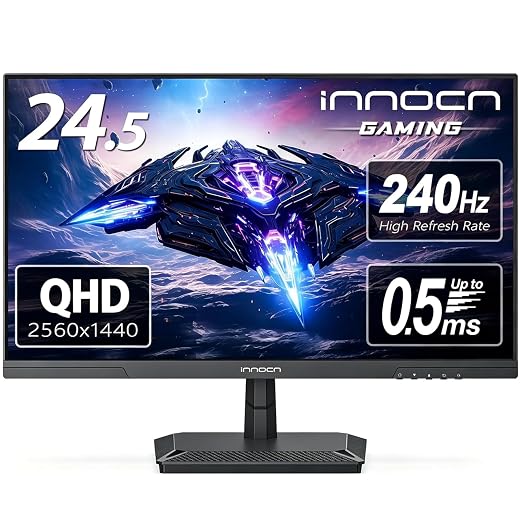
INNOCN 25G2S for compact 1440p competition
High-refresh performance at an unusually low price
At 24.5 inches, the INNOCN 25G2S puts QHD pixels into a dense, desk-friendly canvas that suits players who prefer fast, focused multiplayer over a cinematic 4K view. Its Fast IPS panel also keeps the image more consistent when viewed slightly off-centre than many budget VA alternatives.
The 240 Hz headline is chiefly a PC advantage, delivered through DisplayPort. On PS5, the meaningful purchase checks are whether the HDMI input accepts 1440p at 120 Hz and whether VRR engages reliably at that mode. Native 4K detail is not this monitor’s proposition.
- Dense 1440p image at 24.5 inches
- Fast IPS viewing angles and motion focus
- 240 Hz headroom for a gaming PC
- Strong value around $130
- 240 Hz does not benefit PS5 play
- No native 4K presentation
- PS5 1440p120 and VRR need confirmation
- HDR credentials are not the main draw
For competitive players, this is an appealing compact QHD route with IPS clarity and a high-refresh PC future. Treat 240 Hz as a bonus for DisplayPort-equipped PCs; for PS5, confirm 1440p/120 Hz over HDMI and compatible VRR before buying. It is a speed-first alternative to a native 4K screen, not a substitute for one.
SANSUI 27-Inch Curved 120Hz: low-cost desk-and-console flexibility
Affordable everyday monitor with built-in speakers
At roughly $110, this 27-inch curved SANSUI is aimed at a simple shared setup: casual supported PS5 120 Hz play, work, streaming, and light PC use without adding separate speakers. Its USB-C connection and built-in audio make particular sense where desk space and spend are tighter than display ambitions.
The important caveat is the HDMI input. The listing specifies HDMI 1.4, not HDMI 2.1, so the relevant question is not the 120 Hz badge but which resolution/120 Hz timing the monitor accepts from a PS5. That should be confirmed in the manual or with the seller before purchase.
- Very low entry price
- 120 Hz panel for desktop use
- USB-C and integrated speakers
- High stated 4000:1 contrast
- HDMI 1.4 limits bandwidth
- PS5 120 Hz timings need confirmation
- 300-nit brightness is modest
- Tilt-only stand adjustment
The SANSUI earns consideration as an inexpensive everyday display rather than as a guaranteed high-end PS5 monitor. Buy only when its native resolution and PS5-compatible 120 Hz HDMI modes match the games intended to be played. Without that confirmation, the saving can become a frustrating compromise.
Getting a PS5 to actually output 120 Hz
-
Use the monitor’s fastest HDMI input
Connect the PS5 directly to the port documented for 4K/120 or 1440p/120. Some displays reserve full-bandwidth operation for one HDMI socket; AV receivers, capture devices, and HDMI switches can restrict the handshake.
-
Start with the supplied PS5 HDMI cable
It is certified for the console’s HDMI 2.1 bandwidth. A short, reputable Ultra High Speed HDMI cable is the sensible replacement; old “High Speed” leads often cause a 4K120 fallback.
-
Enable the input’s enhanced mode
In the monitor’s settings, turn on any HDMI 2.1, Enhanced, 4K 120, or high-bandwidth option. This setting can be per port and may require reconnecting the cable.
-
Set the console preference and the game mode
Under PS5 Settings > Saved Data and Game/App Settings > Game Presets, choose Performance Mode. Then select the game’s 120 Hz or Performance mode; many titles do not expose 120 fps by default.
-
Read the PS5 signal report
Open Settings > Screen and Video > Video Output > Video Output Information while the game is running. It reports the active resolution and 120 Hz status—more reliable than a monitor’s vague “120 Hz capable” menu.
If 120 Hz remains unavailable, disable forced 4K temporarily, update monitor firmware, and test direct connection with HDR or VRR toggled off.
The PS5 home screen and many games run at 60 Hz. Check Video Output Information during a supported game, after its performance setting has been applied.
If that page still shows 60 Hz, the usual culprits are the wrong HDMI port, an unenabled enhanced-input mode, a bandwidth-limited cable or intermediary, or a game that lacks a 120 fps mode.
Three claims worth testing before buying
The panel may refresh at 120 Hz while its HDMI input accepts only 1080p120, or only 60 Hz at the desired resolution.
A listing’s refresh-rate figure can describe DisplayPort or a PC-only overclock. The decisive specification is the HDMI timing table, ideally confirmed by PS5 output reports or testing.
“HDMI 2.1” can appear on ports without the bandwidth or implementation needed for 4K120.
Look for explicit 3840 × 2160 at 120 Hz support on the relevant HDMI port; FRL bandwidth, HDR and VRR support should be documented separately.
VRR matches display refresh to fluctuating game frame rates; it does not create performance.
It can make a 70–100 fps range look steadier and reduce tearing, but the game and PS5 still determine the frame rate.
Buy the signal path, not the HDMI label
- Check the retailer’s manual or support page for the exact HDMI port that accepts the intended PS5 mode; a monitor may have multiple ports with different limits.
- After setup, use PS5 Settings → Screen and Video → Video Output Information and test a 120 Hz-capable game. Verify VRR separately, since its availability can change by resolution and HDR state.
For the clearest premium PS5 target, choose the Amzfast 32-inch only after confirming its HDMI ports accept 4K at 120 Hz from PS5 and that VRR works in that mode. Its large 4K panel is the strongest fit for cinematic single-player games.
The INNOCN 24.5-inch is the sharper competitive choice when documented 1440p/120 Hz and PS5 VRR matter more than 4K. Choose the SANSUI 27-inch for low-cost everyday use, not on the assumption that its 120 Hz panel guarantees a console 120 Hz input. HDMI 2.1 matters only when the selected port, resolution, refresh rate, HDR, and VRR combination all work together.