For occasional documents, reliable toner matters more than glossy photo output.
The boarding pass needs printing ten minutes before leaving; the inkjet wakes up with streaks, empty-looking colours, or a cleaning cycle that drains what was left. That familiar failure is not really about print quality—it is about a machine sitting idle between tax forms, return labels, school notices, and travel paperwork.
For that pattern, a compact monochrome laser is usually the sensible answer. Toner is a dry powder, so it does not clog in the printhead after weeks or months of inactivity, and a cartridge typically delivers far more black-and-white pages than entry-level ink. The trade-off is deliberate: no colour photos, but crisp text, fast first pages, and far less maintenance anxiety. The strongest occasional-use printer is the one that remains ready when the document cannot wait.
- A laser’s stated toner yield is measured at 5% page coverage; dense forms and graphics use more toner.
- Built-in duplex printing can halve paper use for long statements and forms.
Why toner suits long gaps
Laser printers place dry toner powder on the page, then fuse it with heat. Unlike liquid ink, that powder does not sit in microscopic printhead nozzles where moisture can evaporate and residue can harden. A printer can therefore remain unused for weeks or months and usually be ready for a clean text page when switched back on.
Inkjets also run automatic maintenance routines: they push ink through the head to keep nozzles open. Those cycles can consume a surprising amount of ink without producing a single document. Laser models have no equivalent ink-flushing cycle, which makes their page yield more predictable for occasional invoices, forms, labels, and school documents.
The compromise is important. These monochrome machines print sharp black text and line art, but they cannot handle regular color charts, craft projects, or photo printing. Toner cartridges still deserve care: keep sealed spares cool, dry, and level, away from direct sun and extreme heat. For an installed cartridge, occasional printing is helpful, but it is not a defense against the clogging problem found in inkjet heads.
Keep paper in its wrapper or a sealed box. Humid sheets can curl, feed poorly, and reduce the crisp results that make a laser printer appealing.
Pick the laser that matches the desk


Each model uses dry toner, so a long quiet spell is far less likely to end in clogged printheads or a cleaning-cycle ritual. Run a test page after moving the printer, keep paper dry, and expect sharp black text—not color photos or glossy graphics.
Brother DCP-L2640DW: the home paperwork hub
01
Best for versatile home-office printing and scanning
The Brother DCP-L2640DW is the occasional-use laser for homes where printing is only half the job. Its flatbed handles receipts, fragile originals, and ID cards, while the 50-sheet automatic document feeder makes short stacks of forms far less tedious. The substantial 25-pound body and roughly $210 price make sense when scanning and copying are regular household chores—not merely nice-to-have extras.
- Dry toner stays dependable through long idle spells
- Flatbed supports IDs, receipts, and bound documents
- 50-sheet ADF speeds multi-page scanning and copying
- Duplex printing and 250-sheet tray reduce routine handling
- Wireless printing works with phones, tablets, and computers
- Larger and heavier than a print-only compact laser
- Higher upfront cost for homes that rarely scan
- Black-and-white output is unsuitable for color documents or photos
In brief A genuinely useful all-in-one rather than a printer with an occasional scanner attached. It earns its space when paper records still arrive at the door.
For an occasional printer that must also tame household paperwork, this is the most complete choice. Toner avoids the dried-ink penalty of long breaks, and the flatbed plus document feeder covers both awkward one-off originals and batches of forms. Choose it deliberately for that scanning and copying capability; a lighter print-only laser is better value when those jobs are rare.
Brother HL-L2460DW for burst printing
Top choice for fast, efficient everyday documents
The Brother HL-L2460DW is built for homes that may print nothing for days, then need a stack of lesson packs, forms, invoices, or tax records without a long wait. It is a print-only monochrome laser, so it suits a document-first desk rather than an all-in-one workstation.
Its compact body makes sense where a scanner already exists, documents arrive digitally, or paper records only need reliable output.
- Up to 36 ppm for sizeable runs
- Automatic two-sided printing cuts paper use
- 250-sheet tray handles less frequent refilling
- Wi-Fi, Ethernet, USB, and mobile printing
- Toner avoids inkjet clogs after downtime
- No scanner or copier
- Black-and-white output only
- Envelope capacity and specialty-media flexibility are limited
- Refresh subscription trial warrants cost review
For intermittent but substantial black-and-white printing, this Brother makes the practical case for laser: it can sit idle without ink drying out, then move through a pile at up to 36 pages per minute. Automatic duplexing matters on multi-page packets, while the 250-sheet tray prevents a tax-season or school-week print run from becoming a constant paper-loading chore.
Choose the DCP-L2640DW or another all-in-one instead when scanning receipts, signed forms, or worksheets is part of the same routine. This model is the cleaner choice when printing is the whole job.
Brother HL-L2405W: low-cost laser for infrequent documents
Affordable monochrome printing with generous paper capacity
The HL-L2405W is the straightforward choice for households that mainly need crisp letters, forms, labels, and return documents after weeks of silence. Its dry-toner engine avoids the ink-drying problem that makes cheap inkjets expensive to own when printing is sporadic. Wireless and USB connections cover both shared-home and single-computer setups, while the 250-sheet tray is unusually practical at this price.
- Dry toner remains usable through long idle periods
- Low purchase price for a compact laser
- 250-sheet tray reduces refill interruptions
- Wireless and USB connectivity
- Single-sided printing requires manual page turning
- Print-only design offers no scanning or copying
- 30 ppm is capable, but not the fastest Brother here
- Toner replacement cost matters more than shelf price
For light, irregular black-and-white printing, the HL-L2405W makes a strong case: it is compact, properly paper-capable, and far less vulnerable to inactivity than an inkjet. It is not a multifunction bargain. Anyone needing scans, copies, or automatic two-sided documents will recover the extra upfront spend on a more capable model in everyday convenience.
Canon imageCLASS LBP6030w: a laser for the narrowest desk
- 14.3 × 9.8-inch footprint
- Dry toner tolerates long idle periods
- 150-sheet enclosed paper supply
- Wireless document printing
- Low Energy Saver draw
- Print-only: no scan or copy
- 19 ppm is modest by current laser standards
- No automatic two-sided printing
- Older, basic wireless experience
At 14.3 inches wide, 9.8 inches deep, and 7.8 inches high, this Canon is a sensible choice for a shelf or apartment desk where larger lasers simply will not fit. Its job is deliberately narrow: send ordinary black-and-white documents wirelessly and collect them from a 150-sheet tray.
The trade-off is an older, dedicated print-only design. There is no scanner, copier, or automatic duplexing, and 19 ppm is adequate rather than speedy. For occasional forms, labels, and school papers, that restraint can be a virtue: fewer features compete for space, while Canon Toner 125 is rated for 1,600 pages.
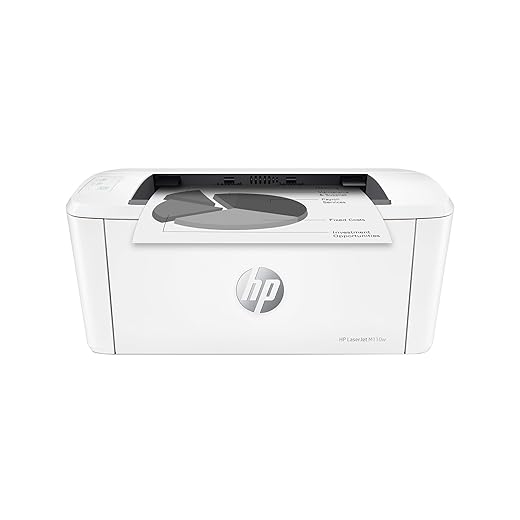
HP LaserJet M110w for the truly occasional page
- Dry toner tolerates long idle periods without inkjet-style nozzle clogs
- Tiny, 9-pound body is easy to place in a tight home workspace
- Mobile printing covers quick forms and reference pages from phones or tablets
- Up to 21 ppm prevents a short print job from becoming a wait
- Monochrome-only output rules out color labels and photos
- Modest paper handling becomes tiresome for repeated multi-page packets
- No automatic duplexing, so two-sided documents need manual intervention
- Print-only design cannot replace a scanner or copier
For a household that prints only a few black-and-white forms, labels, or reference sheets each month, the HP LaserJet M110w is a sensible space-saving choice. Its dry toner and compact chassis solve the two classic occasional-use problems: clogged ink and a printer that monopolizes the desk.
It is less convincing once recurring packets enter the picture. Manual two-sided printing and modest paper capacity make a larger Brother a better fit for substantial paperwork.
Choose the workflow, not just the smallest price tag
-
Color and scanning
All five models print monochrome only, ideal for forms, labels, and text. Choose the DCP-L2640DW when copying, scanning, or feeding multi-page originals matters.
PrioritizeAn all-in-one only if paperwork arrives on paper.Think twicePaying for a scanner that will sit unused. -
Paper handling and duplexing
A 250-sheet tray suits batches and reduces refilling; the Canon’s 150-sheet tray and HP’s lighter workflow suit occasional pages. Automatic duplexing is valuable for recurring statements, while manual duplexing is tolerable for rare packets.
PrioritizeAuto-duplex and a deep tray for routine document runs.Think twiceManual page flipping for frequent two-sided jobs. -
Desk space and wireless use
The Canon and HP favor tight desks, while the Brothers trade more room for stronger paper handling. Confirm that the preferred phone, laptop, or Wi-Fi setup works without relying on a permanently connected computer.
PrioritizeA footprint and mobile-print method that fit the actual workspace.Think twiceAssuming every wireless workflow is equally convenient. -
Toner cost and availability
A stated page yield is a standardized coverage estimate, not a personal annual cost. Compare readily available standard and high-yield cartridges, then compare the real cost per printed page against expected use; a higher-yield cartridge can tie up more cash and may never be emptied.
PrioritizeEasy-to-find toner sized to realistic output.Think twiceTreating the largest quoted yield as automatic savings.
For sporadic printing, toner’s biggest advantage is not wasting a cartridge to clogs or cleaning cycles. But ownership cost still includes the printer, toner purchased up front, and any replacement bought years later. A modest-capacity cartridge may be the smarter choice when it is inexpensive, broadly stocked, and likely to be used before a household’s needs change.
Keep a laser ready for the next job
Laser printers eliminate the dried-ink problem, but they are not invulnerable. Keep paper in its wrapper or a sealed box until needed; humidity causes curled sheets, weak feeding, and jam-prone stacks. For a seldom-used machine, load only a small amount of plain paper and remove it if the room is damp.
Store spare toner level, in its original bag, away from direct sun and heat. There is no need to print weekly “maintenance” pages, but a one-page test before an urgent tax form or travel document can expose an empty cartridge, stale Wi-Fi connection, or pickup-roller issue early.
Keep the connection predictable
Assigning the printer a reserved IP address in the router can make it easier for computers to find after long gaps. Firmware updates can improve security and reliability, but install them deliberately: avoid interrupting power, and do not update minutes before a deadline. If a printer shows as connected but will not print, clearing old jobs and restarting the printer and router usually comes before replacing supplies.
The remaining age-related risks are mechanical: rollers can harden, toner can clump after extreme heat, and paper dust can affect feeding. A repeated jam at the same point merits service or replacement—not more toner.
A full tray is convenient for frequent packets. For a printer used only a few times a month, 20–50 sheets of fresh paper reduces moisture exposure while still keeping the machine ready.
Choose the Brother DCP-L2640DW when scanning, copying, and multi-page originals matter; its feeder makes it the clear household paperwork choice. Pick the HL-L2460DW for frequent document bursts, the lower-cost HL-L2405W for basic black-and-white pages, or the compact Canon LBP6030w for a tight desk. For genuinely isolated pages and minimal footprint, the HP LaserJet M110w is the most sensible fit.