A laptop that breezes through the opening hours can still buckle when every region is alive at once.
At first, a modest island, a few trade routes, and a tidy production chain feel effortless. Then the save gains Crown Falls skylines, busy harbors, commuter networks, expedition fleets, and several regions ticking simultaneously; fast-forward becomes the real benchmark. Camera panning may hitch even when the frame-rate counter looks respectable.
Anno 1800 leans heavily on sustained CPU simulation and available memory as population and logistics multiply. A 16GB machine can launch the game well, but 32GB RAM leaves far more room for a late campaign, background apps, and long sessions without paging to storage. A modern eight-core-class CPU, strong cooling, and a 1TB SSD are the sensible floor for an empire intended to grow rather than merely start. Dedicated graphics still matter for high detail and busy views, but the GPU alone will not rescue a CPU-bound save.
- 32GB RAM is the most meaningful late-game headroom upgrade.
- Cooling matters because simulations load the processor for hours, not seconds.


Why the official requirements stop helping
Published requirements usually describe whether Anno 1800 will launch and render an early settlement, not whether a mature save remains pleasant after dozens of hours. A laptop can report a respectable average FPS while the game’s underlying tick rate is already slowing down.
Four kinds of “smooth”
Frame rate is the GPU-facing measure: camera movement and visuals may look fluid at 60 FPS. Simulation speed is different: every resident, factory chain, ship, trade calculation, and AI decision must be processed by the CPU. When that work exceeds the available CPU time, game days pass more slowly—even at unchanged graphics settings.
Input response also suffers during heavy recalculations. Selecting buildings, opening statistics, issuing trade orders, and scrolling dense districts can feel delayed, while fast-forward becomes the clearest stress test: the highest speed setting may behave little faster than normal speed.
What makes a save heavier
Load does not rise from population alone. It compounds as a world gains:
- multiple large islands, commuter networks, and intricate production chains;
- busy shipping routes, many warships, and active AI competitors;
- DLC systems such as Docklands, Tourist Season, The High Life, and New World Rising;
- mods that add assets, production recipes, residents, or map content;
- browser tabs, launchers, overlays, cloud sync, and background updates competing for CPU time and memory.
Graphics options can improve FPS, but they rarely rescue a CPU-bound late save. Sustained processor performance, ample RAM, and cooling that prevents clock-speed collapse matter more once the city becomes a living logistics network.
For late-game buying decisions, time to advance an in-game day at maximum speed is more meaningful than an FPS figure recorded in a small early city. A laptop that maintains fast-forward after a long session is the safer choice.
Buy sustained CPU speed, not a badge
A late-game Anno 1800 city is less interested in a processor’s launch-day label than in what that processor can sustain after the chassis has warmed up. The important measure is multi-core performance at the laptop’s long-term power limit: the speed available 20 minutes into a dense save, while workers, trade routes, production chains, and background Windows tasks are all active.
Current H- and HS-class processors are the sensible starting point. AMD Ryzen 7/9 HS or H models and Intel Core Ultra 7/9 H-series models generally provide the core count and power envelope that large saves need. However, the chip name alone is not a verdict: two laptops carrying the same CPU can differ sharply because one holds roughly 50–80 W under load while another settles far lower to control heat and fan noise.
Cooling changes the result
A thicker performance chassis, dual-fan cooling, and a generous plugged-in power profile are valuable because they preserve boost clocks during extended simulation. Thin 14-inch machines can still run the game well, but they are more likely to reduce CPU power after heat builds. Reviews that report sustained CPU wattage, temperatures, and long-run benchmarks are more useful than a retailer’s processor badge.
A discrete GPU still helps at high resolutions or with visual settings raised, but it does not rescue a CPU that is throttling through a mature session. For this game, an RTX label should be treated as a graphics feature, not proof of late-game responsiveness.
Memory is the other hard limit
16GB is the minimum worth considering, provided it is dual-channel and not burdened by heavy browser use or other applications. It can run the game, but large saves plus Discord, a browser, mods, and Windows caching leave little comfortable headroom.
32GB is the practical purchase target for anyone expecting long sessions, big populations, or multitasking. It reduces paging to the SSD when memory pressure rises, which helps avoid the stutters and sluggish task switching that can make an otherwise capable laptop feel tired. Prefer a model with 32GB fitted or genuinely upgradeable memory; many slim systems have soldered RAM.
Before buying, look for a review of the exact laptop model and confirm:
sustained CPU power and thermal behavior on mains power a performance mode that does not require extreme fan noise 32GB RAM, or accessible slots for a real upgrade dual-channel memory rather than a single 16GB moduleBuy graphics for the screen, not the sticker
Anno 1800’s late game is not a conventional GPU race. The graphics card chiefly determines how comfortably the city can be viewed at a chosen resolution, quality preset, zoom level, and monitor refresh rate; it does far less for the simulation pauses caused by a saturated CPU.
For a 1080p, 60–120Hz laptop, a modern midrange GPU with 6–8GB of VRAM is ample for a high-detail map view. At 1440p/QHD, or on a large external display with high-quality shadows, ambient occlusion, and anti-aliasing, 8GB is the safer target. A higher-tier GPU makes sense for 4K, heavy mod use, or other demanding games—but it should never force a drop from 32GB RAM, a weaker CPU class, or a thin chassis with poor sustained cooling.
Integrated graphics can run smaller settlements at restrained settings, but it shares system memory and leaves little headroom for a mature, busy city. Discrete graphics also helps preserve smooth panning and zooming while the CPU is working through a dense economy. To choose a gaming laptop around the games it will actually run, treat the panel as part of the GPU decision: a 1600p or 240Hz display raises cost and power draw even when Anno cannot use its refresh ceiling.
DLSS, FSR, and frame generation can improve visual fluidity when GPU-limited, especially at QHD or 4K. They cannot shorten a late-game simulation tick. Native rendering at sensible settings remains the more meaningful test.
Reasons to walk away
-
The GPU consumes the budget
A discounted RTX badge is poor value if it comes with 16GB memory or a lower-power CPU. Anno benefits more from platform balance than peak shader throughput.
Keep32GB-capable system with a strong H/HS CPURejectHigh-end GPU paired with 16GB RAM -
The display outruns the hardware
QHD and 4K panels are attractive, but they raise GPU demand and often appear on expensive configurations. A good 1080p panel can fund better cooling and memory.
KeepResolution suited to the intended desk displayReject4K panel on an entry-level GPU -
The chassis hides a low-power GPU
Laptop GPU names do not reveal its wattage or cooling capacity. Check independent sustained-performance tests, not just the specification sheet.
KeepReviewed power limits and stable thermalsRejectThin sale model with unspecified GPU power -
Storage is fixed at a token capacity
A 512GB SSD fills quickly once several large games and saves are installed. Expansion matters more than a small price cut.
Keep1TB SSD or a spare M.2 slotRejectNon-upgradeable 512GB storage
Choose the tier that matches the city, not the spec sheet
The Victus pairs an 8-core Core i5-13420H with RTX 4050 graphics, 16GB DDR4, and a 512GB NVMe SSD. Its 144Hz 1080p IPS screen is a sensible match for the GPU, so money is not being spent driving pixels Anno 1800 does not need.
This is the route for a player starting a long campaign at 1080p and willing to be disciplined once the save grows: keep browser tabs and launchers out of memory, save space for updates, and expect simulation speed—not frame rate—to become the constraint. The 250-nit, 45% NTSC panel is functional rather than a premium visual showcase.
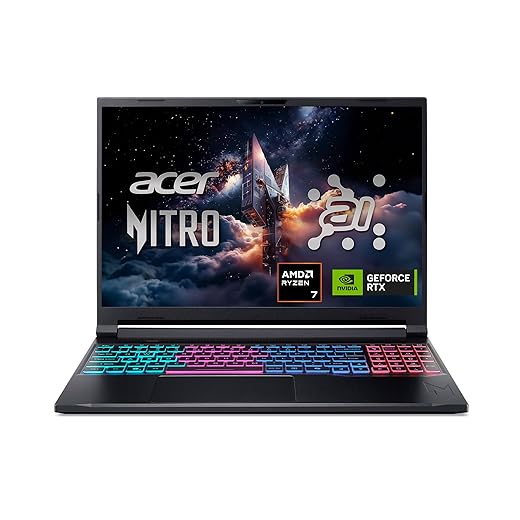
This is the balanced recommendation: Ryzen 7 260, 32GB DDR5, a 1TB Gen 4 SSD, and RTX 5060 Laptop graphics. The 16-inch 1920×1200, 180Hz display adds useful vertical room for interfaces while keeping resolution modest enough that the GPU is not the purchase’s weak link.
The important upgrade is not the high refresh rate; it is the memory headroom. Large cities, DLC, a browser, guides, and background utilities can coexist with far less risk of paging to storage. Acer also specifies quad-intake cooling, which matters more to an all-evening city session than a brief benchmark burst. It suits most players who want a machine to remain comfortable as a save matures.
The Katana combines a Ryzen 9 8945HS, RTX 4070, 32GB DDR5, and 1TB SSD with a 15.6-inch QHD 165Hz screen. That extra GPU capacity is justified when crisp QHD presentation, demanding visual mods, or other GPU-heavy games share the laptop’s role.
For Anno alone, its advantage is not that it makes the simulation fundamentally different: late-game ticks still lean on CPU behavior and cooling. Instead, it protects visual settings and resolution while retaining the 32GB baseline. Cooler Boost 5 is designed for sustained cooling, though premium gaming hardware can still be louder and less travel-friendly under load. It fits players building densely modded worlds who also want a genuinely stronger all-purpose gaming machine.
Discount labels can hide the parts that matter
An older four-core i7 can trail a current six- or eight-core H/HS chip badly in sustained simulation.
Check the exact CPU model and review its long-run power behavior, not the badge.
Some slim models cut power after the brief benchmark burst, then settle at much lower clocks.
Look for reviews with 20–30 minute loads and note fan noise, temperatures, and sustained wattage.
Many discounted models solder memory, ship with one RAM slot, or provide only one cramped M.2 bay.
Confirm the exact configuration’s slots before purchase; large saves, mods, Windows, and other games fill 512GB quickly.
Low-power RTX 4050/4060 variants can be constrained at QHD, especially when paired with an expensive 165Hz panel.
Prioritize CPU, 32GB memory, and cooling; choose the GPU tier for the panel’s native resolution.
Retail listings often combine several configurations under one model name. Confirm CPU suffix, RAM capacity and whether it is soldered, SSD size and spare slots, GPU wattage, and screen resolution for the discounted unit.
A lower price is worthwhile only when it does not trade away the parts that cannot be fixed later.
Set the laptop up before the first megacity
-
Confirm Anno is using the dedicated GPU
In Windows Graphics settings or the Nvidia/AMD control panel, assign Anno 1800 to the high-performance GPU. Check in-game or Task Manager during a loaded save; hybrid graphics occasionally selects the integrated chip.
-
Play on mains power and select Performance mode
Battery operation sharply limits CPU package power and GPU clocks. Use the maker’s Performance or Turbo profile when building a large city, ideally with the rear exhaust unobstructed.
-
Update cleanly, then remove interference
Install current GPU and chipset drivers, but avoid stacking overlays. Disable unused Discord, Steam, GeForce, Xbox Game Bar, recording, and hardware-monitoring overlays, especially when troubleshooting stutter.
-
Keep the SSD comfortably empty
Reserve roughly 15–20% free space on the game drive for Windows updates, shader caches, paging, and save backups. A nearly full SSD can make background maintenance and asset streaming less graceful.
-
Lower the settings that actually help
At the target resolution, reduce shadows, ambient occlusion, anti-aliasing, and resolution scale first; cap frames if fan noise or heat is excessive. These changes help GPU-bound scenes, but no preset can fully fix an enormous save limited by CPU simulation.
Test changes in the same dense save and camera view; the menu benchmark is less revealing than late-game play.
- CPU first Prioritize a well-cooled H/HS-class CPU with proven sustained performance over a thinner chassis or a higher GPU label.
- Memory matters Treat 32GB RAM as the sensible late-game target, especially for large saves, mods, browsers, and background tools.
- Balanced graphics Match graphics to the display: RTX 4060-class for 1080p, RTX 4070-class for QHD; protect CPU cooling and RAM first.
Buy the laptop that still fits next year’s empire
- Practical 1080p: cooled Ryzen 7/Core i7 H or HS CPU, RTX 4060, 32GB RAM, 1TB SSD.
- Best-value late game: the same CPU-and-memory baseline with a full-power RTX 4060 and an upgradeable second SSD slot.
- QHD and heavy mods: strong RTX 4070 model, 32GB RAM, 1TB–2TB SSD, and independently verified cooling.
The safest final rule is simple: spend for sustained CPU headroom and 32GB memory, then choose only as much GPU as the screen needs. A flashy graphics card cannot rescue a processor that throttles through long simulation turns.
For any tier, a reputable chassis with reviewed thermals, mains-powered performance mode, and room for storage is worth more than a marginal paper-spec upgrade. That combination keeps a growing Anno 1800 save responsive instead of merely running.