A pretty average FPS number can hide the stutters that ruin a crowded Lower City fight.
The warning signs usually arrive in Lower City: a camera sweep across packed streets, an area-of-effect spell detonating, companions repositioning—and the game suddenly feels less responsive than it did in the opening hours. Baldur’s Gate 3 is not merely a GPU test. Its late-game scenes can lean hard on the CPU, system memory, storage streaming, and sustained cooling.
That makes frame-time consistency the meaningful measure. A laptop averaging 60 fps but repeatedly dipping during NPC-heavy traversal or combat animations feels worse than one holding a steadier 45–50 fps. The strongest choices pair a capable RTX GPU with modern multi-core processing and enough thermal headroom to maintain clocks over a long session, rather than delivering one impressive benchmark run.
- Aim for 16GB RAM minimum; 32GB leaves more room for background apps and demanding late-game areas.
- Use SSD storage and play while plugged in—battery modes commonly reduce CPU and GPU power limits.
Choose the Right Performance Tier




Hardware that prevents late-game stutter
-
A current CPU with thermal headroom
Act 3’s dense crowds, AI routines, and draw-call load can bottleneck the processor before the GPU is fully occupied. A capable modern CPU needs a cooling system that can hold its clocks during a long session.
PrioritizeModern multi-core CPU and a chassis built for sustained power.Watch out forThin cooling that cuts CPU clocks once the laptop warms up. -
Discrete graphics with sensible VRAM
GPU power still determines resolution, visual presets, and the room available for demanding effects. VRAM matters most when textures and scene data pile up; running out produces uneven delivery, not merely a lower average frame rate.
PrioritizeAn RTX-class GPU matched to the display resolution and settings.Watch out forTreating upscaling as a cure for a VRAM or CPU limit. -
16GB RAM and an NVMe SSD
Sixteen gigabytes is the practical floor for avoiding background-app pressure, while 32GB adds welcome margin. Fast SSD access helps the game stream city assets without storage-induced pauses.
Prioritize16GB minimum RAM and a fast NVMe drive with free space.Watch out for8GB memory or a nearly full, slow storage drive. -
Frame-time consistency over headline FPS
A laptop that averages well but repeatedly dips while entering a busy district feels worse than one with a slightly lower, steadier rate. Cooling, memory capacity, and CPU behavior all show up in those hitches.
PrioritizeStable performance after the system has been under load.Watch out forChoosing solely by a peak or average FPS claim.
These picks favor balanced machines rather than a graphics-card ranking. For broader context on how to match gaming-laptop hardware to the games being played, consider the whole platform, not the GPU name alone.
The useful test is a long late-game session in populated areas, after the chassis has warmed up. That exposes CPU throttling and cooling weaknesses that brief benchmark runs can miss.
Each tier is judged by the settings and resolution it can maintain smoothly, with sensible use of upscaling where needed. Lower tiers remain viable when expectations favor stable frame pacing over maximum visual presets.
RAM capacity and SSD behavior are treated as first-class factors because asset streaming and memory pressure can masquerade as a graphics problem.
Acer Nitro V 16S AI: the high-settings Act 3 choice
01
Best for portable Act 3 performance
The Nitro V 16S AI is the least compromised option here for players who want Baldur’s Gate 3 to stay responsive through crowded Act 3 encounters while leaving room for high settings, upscaling, and a browser, voice chat, or recording app in the background. Its Ryzen 7 260, RTX 5060 Laptop GPU, 32GB of DDR5 memory, and 1TB Gen 4 SSD form a notably well-rounded late-game configuration.
The 16-inch 180Hz panel also suits fast desktop use and smoother camera movement, though its WUXGA resolution is a performance-friendly 1920×1200 rather than a higher-resolution screen. Before buying, confirm the exact listing’s installed RAM, GPU wattage limit, and panel specification: those details determine whether this advertised ceiling carries over to the machine delivered.
- RTX 5060 and 32GB RAM provide meaningful headroom for dense late-game areas
- Ryzen 7 260 and Gen 4 SSD support responsive streaming and multitasking
- 180Hz WUXGA display favors fluid play without imposing a heavy pixel load
- 4.6-pound chassis is easier to carry than many performance-focused 16-inch systems
- RTX 5060 Laptop performance varies substantially with the seller’s configured power limit
- WUXGA is sharp enough for gaming, but not the best fit for buyers seeking QHD-class desktop space
- Quad-intake cooling can become audible during sustained gaming
- Around $1,400 is a premium over capable 1080p-oriented alternatives
Quick take A strong all-round specification with the clearest margin for demanding Baldur’s Gate 3 sessions. Verify the precise GPU power and display configuration before paying for that margin.
For the smoothest path to high-settings Act 3 play, this is the most complete configuration in the roundup. 32GB of RAM is especially valuable when the game shares memory with everyday background software, while the RTX 5060 offers the strongest graphics headroom here.
It is not a silent or inexpensive solution, and the actual result depends on the configured GPU power limit. With that detail confirmed, it is the pick for buyers who prefer performance reserve over chasing the lowest price.
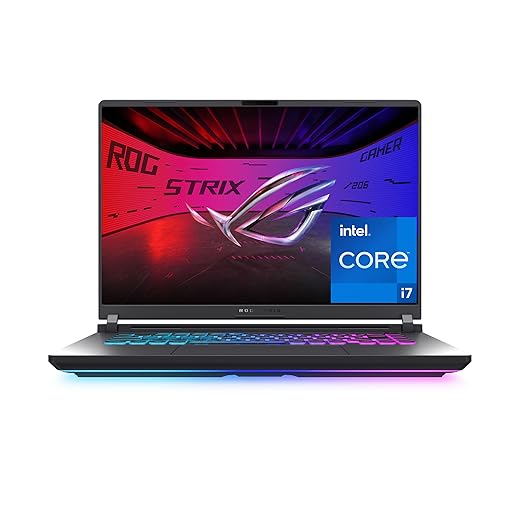
Top choice for serious gaming sessions
The ROG Strix G16 is the polished alternative for players who want a more enthusiast-focused machine than a basic RTX 5060 laptop. Its Core i7-14650HX is a capable 16-core pairing for Baldur’s Gate 3’s crowded Act 3 CPU load, while the tri-fan cooling design is built for longer sustained sessions rather than short benchmark bursts.
At roughly $1,500, it makes most sense when discounted close to similarly equipped rivals. The trade-off is clear: this version has 16GB of RAM and a 1920×1200 165Hz panel, not the 32GB and sharper 1600p-class screen often found on premium-sale alternatives. Before paying extra for the Strix name, confirm the retailer’s RTX 5060 power limit; GPU wattage can meaningfully separate otherwise identical 5060 configurations.
- Core i7-14650HX has strong multicore headroom for dense Act 3 areas
- Tri-fan cooling targets sustained performance
- Tool-free RAM and SSD access improves upgrade prospects
- 165Hz 16:10 screen suits fluid play
- 16GB RAM is merely adequate for a premium-priced 2025 gaming laptop
- 1920×1200 panel is less crisp than 1600p alternatives
- RTX 5060 wattage is not stated in the listing
- Around $1,500 is compelling mainly on sale
Acer Nitro V 15: practical 1080p Act 3 value
Strong value for smooth 1080p gaming
The listed Nitro V pairs a Core i5-13420H with an RTX 5050 Laptop GPU, 16GB RAM, and a 165Hz 1080p IPS display—a sensible baseline for Baldur’s Gate 3 without paying RTX 5060 money. That 16GB configuration matters: confirm it is the supplied configuration rather than an ambiguous seller upgrade.
For Act 3, the sensible target is 1080p High or Ultra with DLSS on Quality; Balanced is the more pragmatic fallback when busy streets or spell-heavy fights make frame times uneven. Native-resolution Ultra is possible in lighter scenes, but it leaves less margin for the city’s heaviest moments, background apps, or future patches. Baldur’s Gate 3 has no ray-tracing setting, so the GPU’s RT credentials should not drive this purchase.
The 512GB SSD is adequate for the game, though a larger library will make an upgrade or external storage attractive. Compared with RTX 5060 systems, this is the cheaper route to comfortable play—not the one with the deepest reserve for large mod lists, texture packs, or a higher-resolution external display.
- Verified 16GB listing configuration
- Comfortable 1080p DLSS target
- 165Hz IPS panel
- Lower cost than RTX 5060
- Less headroom for heavy mods
- 512GB fills quickly
- Native Ultra has tighter margins
- CPU is modest for the class
- RTX 4050 provides real dedicated-GPU headroom for 1080p Baldur’s Gate 3.
- 144Hz panel suits smoother exploration and other fast-paced games.
- Wi‑Fi 6E and NVMe storage are useful everyday extras.
- Thin gaming designs commonly run louder and reduce sustained clocks during long, hot sessions.
- 16GB is adequate, but large mod lists and background apps leave little reserve.
- Battery life drops sharply while gaming; mains power is the sensible performance mode.
- 16GB RAM avoids the worst memory pressure
- RTX 3050 6GB can handle tuned 1080p
- 144Hz screen suits lighter games well
- 512GB SSD helps area streaming
- Act 3 demands medium settings, not a no-compromise preset
- Ray tracing and other costly effects should stay off
- RTX 4050 or 5050 deals can be substantially better value
- Frame-rate cap is sensible for steadier pacing
Fix the bottleneck before lowering everything
-
Start with a clean, plugged-in performance profile
Use the laptop’s Performance/Turbo mode, connect AC power, and close launchers, browser tabs, overlays, and sync tools. A quiet background CPU task can turn crowded Lower City scenes into uneven frame pacing.
-
Treat texture quality as a VRAM setting
If textures pop in, hitch during camera turns, or degrade after longer play, lower textures one step before cutting shadows or resolution. This is especially important on 4GB and 6GB GPUs; DLSS improves GPU load but does not create VRAM.
-
Target crowd and CPU pressure separately
Crowd density, animation-heavy areas, and busy combat stress the CPU and system memory. Reduce crowd-related settings first, confirm 16GB RAM minimum, and keep the game on the NVMe SSD.
-
Check sustained temperatures, not a fresh-launch FPS
After 20–30 minutes, watch clocks and temperatures with a hardware monitor. A falling CPU or GPU clock points to thermal or power limits rather than a graphics-quality problem.
-
Repeat one consistent Act 3 route
Test the same crowded street and camera sweep after the laptop is fully warm. Compare frame-time consistency, not only the average FPS shown by a benchmark.
A texture reduction that cures streaming hitches is not the same fix as lowering crowd density to ease CPU spikes. Test each change on the same warmed-up Act 3 route; otherwise, a cooler chassis or quieter background load can disguise the real cause.
Three shortcuts that create expensive regrets
It only means the game can run.
Crowded saves expose weaker CPU cooling, memory limits, and slow storage long before a benchmark average looks alarming.
GPU wattage, VRAM, screen resolution, and MUX/Advanced Optimus support matter too.
A lower-power RTX chip driving a 1600p panel can trail a better-cooled model at 1080p or 1200p.
For BG3, it is the sensible floor.
Check whether memory is upgradeable, storage has a spare M.2 slot, and the charger is large enough to sustain the advertised power mode.
Before ordering, confirm 16GB minimum RAM (32GB for the Nitro V 16S), the exact RTX GPU, and the current price. A lower-spec SKU can erase an apparent bargain; check RAM upgrade access and return terms once more.
The clearest final picks
For maximum Act 3 headroom, choose the Acer Nitro V 16S AI with RTX 5060 and 32GB. The ROG Strix G16 is the premium alternative when its RTX 5060 configuration is better priced or better equipped. The Nitro V 15 is the 1080p value sweet spot; the MSI Thin 15 fits portability-minded players willing to tune settings. Buy the Victus 15 only at a genuinely low price—and only with 16GB RAM.