
A 40% countdown can be real—or simply a loud way to sell a laptop at its usual street price.
At checkout, the timer is ticking, the discount looks enormous, and the product name seems familiar. But a gaming laptop is not one interchangeable item: a retailer may attach the same family name to versions with different GPUs, lower-wattage graphics chips, half the memory, a dim 144Hz panel, or a smaller SSD.
The percentage off matters only after establishing the exact configuration: CPU, GPU and its power limit, RAM capacity and whether it is upgradeable, storage, display resolution/brightness, and model-year chassis. An RTX 4060 laptop, for example, can perform markedly differently depending on its configured wattage and cooling. Compare that precise SKU or manufacturer part number against recent prices—not an inflated list price or a better-equipped review unit. A genuine deal lowers the cost of the machine that delivers the required frame rates, screen quality, and upgrade life; a headline discount may merely make compromises harder to notice.
- Record the manufacturer part number before comparing listings.
- Treat “up to” GPU wattage and soldered RAM as configuration-defining details.
A low price matters only on the right configuration
-
Beating the real going rate
A genuine sale undercuts the recent price of that exact SKU, not its launch MSRP or a similar-looking model with less RAM, a dimmer screen, or a lower-power GPU. A small drop can be meaningful when the machine has rarely sold for less.
Look forA verified price below the configuration’s normal recent street price.AvoidInflated “was” prices and comparisons to mismatched specifications. -
Matching the laptop to the games
The cheapest gaming laptop is not automatically the best buy. A 1080p 144Hz panel, capable cooling, and enough memory may be worth more than a larger discount on hardware that will force compromises in the games or workloads that matter.
Look forPerformance, display, battery, and portability aligned with the intended use.AvoidBuying a headline discount that creates an immediate upgrade or performance problem.
A laptop reduced from $1,499 to $1,099 is not necessarily a better deal than one falling from $1,149 to $999. The second may be the stronger purchase if it has the desired GPU wattage, 16GB or 32GB of dual-channel RAM, and a display suited to the games being played.
The useful question is: would this exact machine still be the sensible choice at today’s competing prices? If not, it is merely cheap—not a deal.
Run a five-minute deal check
-
Save the exact listing
Record the retailer, model/SKU, price, and any coupon required at checkout. A screenshot also captures bundle terms and stated stock condition.
-
Match the full configuration
Compare CPU, GPU, GPU wattage/TGP, RAM, SSD, screen resolution and refresh rate, and operating system. The same laptop family can hide a lower-power GPU, 8GB instead of 16GB memory, or a dimmer panel.
-
Separate the laptop from the extras
Subtract the plausible value of gift cards, software, accessories, or memberships. A bundle is not a price cut on the machine unless those extras would have been bought anyway.
-
Check price history for that SKU
Use a tracker as a starting point, then inspect dated retailer listings. Confirm the tracked item is the same configuration and that the low price was broadly available, not a brief marketplace anomaly.
-
Check the seller and return terms
Verify who fulfills the order, whether it is new rather than open-box, and the return window, restocking fee, and warranty coverage before the countdown expires.
If any major specification cannot be confirmed, treat the comparison as incomplete rather than assuming the family name guarantees a match.
Retailers often create exclusive configurations under the same Legion, Nitro, ROG, or Alienware family name. A price tracker may therefore show a convincing “lowest ever” line for a nearby model with a different display, storage size, or graphics power limit.
Compare the SKU and specification table, not the headline name. If the retailer omits TGP or panel details, manufacturer support pages and the model-number suffix are usually more reliable than the sale page.


The same GPU can mean very different laptops
An RTX 4060 Laptop GPU is not one fixed performance level. Its manufacturer-set graphics power limit, often called TGP, can vary sharply between chassis. Cooling, CPU power sharing, and performance modes also determine whether the GPU sustains high clocks in a long game.
A thin, inexpensive model may carry the same GPU name as a heavier rival yet deliver lower frame rates. The listing must state the wattage or provide a manufacturer specification page. If it does not, treat GPU performance as unverified rather than assuming a top-power implementation.
Other quiet compromises matter just as much:
- Display: 144Hz describes refresh rate, not brightness, color coverage, response time, or resolution.
- Memory: 16GB is adequate today, but DDR4 and a single memory channel can limit some CPU-bound games.
- Storage: A 512GB SSD fills quickly after several modern games; check for a spare M.2 slot.
- CPU and cooling: A capable chip still loses pace when a small cooler forces lower sustained power.
Compare the complete line: exact CPU, GPU TGP, screen panel, RAM layout, SSD capacity, and weight. A cheaper configuration is only a better deal when those cuts do not affect the intended use.
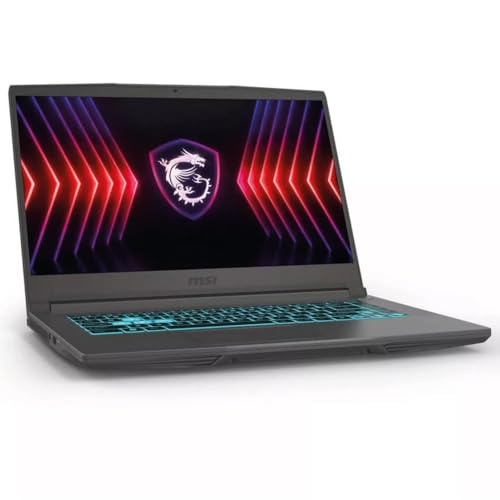
This MSI pairs an RTX 4060 with an i5-13420H, 16GB DDR4, and a 512GB SSD. Its listed 144Hz FHD IPS screen suits fast-paced games.
The listing does not state GPU TGP, RAM channel layout, or panel brightness. Those missing details prevent a like-for-like comparison with another RTX 4060 laptop.
- Graphics
- RTX 4060 8GB
- Processor
- Core i5-13420H
- Memory
- 16GB DDR4
- Storage
- 512GB NVMe
Before buying, search the exact model code plus “GPU power” or “TGP.” Manufacturer manuals and detailed reviews are stronger evidence than a retailer headline.
Read the tag, not just the percentage
- MSRP or list price
The manufacturer’s suggested price, often used to make a discount look large. It is useful mainly at launch; many laptops rarely sell there after the first months.
- Sale price
Today’s checkout price, sometimes conditional on a membership, coupon, trade-in, or financing offer. Those conditions belong in the comparison.
- Normal street price
The typical price from reputable retailers over recent weeks. This is the meaningful baseline for judging a routine “sale.”
- Recent low
The lowest verified price for the exact SKU in roughly the last 30–90 days. A deal near that low is stronger than one merely below MSRP.
- Clearance price
A reduction on outgoing hardware. It can be excellent value, but only if its GPU, display, battery condition, warranty, and remaining lifespan still justify the gap to current models.
Clearance is not automatically a bargain. A prior-generation laptop deserves consideration when it is meaningfully cheaper than a current equivalent—often enough to cover shorter software relevance, weaker efficiency, and fewer configuration choices. If the difference is small, the newer platform usually carries the safer long-term value.
Check the deal behind the price
A retailer’s product page is only half the offer. Before payment, confirm who is selling it and who is shipping it. A marketplace listing marked “fulfilled by” a major retailer may still be sold by a third party; that can change warranty support, return handling, and the condition of the machine.
Read the condition line closely
“Open-box,” “refurbished,” and “floor model” are not interchangeable. Open-box units may be nearly unused, but should include the original charger and a clear return window. Refurbished laptops need a stated grade, a tested battery policy, and a warranty from either the manufacturer or a reputable refurbisher. A floor model deserves a deeper discount because its keyboard, hinges, screen, and battery have endured constant use.
At checkout, calculate the delivered price, not the headline figure:
- item price after any clipped coupon or required membership
- shipping, sales tax, and mandatory protection-plan fees
- return shipping or restocking charges
- warranty length and whether the serial number qualifies for manufacturer coverage
A deal that becomes final sale, charges a 15% restocking fee, or offers only a short seller warranty is rarely worth a small saving. Save a screenshot of the configuration, condition, and promised delivery date before placing the order; it is useful if the delivered laptop differs from the listing.
Buy the verified deal, not the promise
Waiting can pay off, but it is not free. A future promotion may apply only to weaker configurations, limited stock, or a newer model that starts at a higher price. Meanwhile, the laptop needed for current games, school, or work remains unowned.
Buying today is sensible when all of these are true:
- The exact SKU is at or close to its documented low street price, not merely discounted from MSRP.
- Its GPU wattage, display, memory, storage, warranty, and return terms meet the requirement without costly upgrades.
- The next major sale event is more than a few weeks away, or its likely savings would be modest after accounting for stock risk.
- The price fits the budget without financing pressure or sacrificing a needed accessory.
A $100 lower price next month is not automatically a better outcome if the current machine offers months of use and the sale is verified. If an imminent event is within 7–14 days, waiting is reasonable—provided the same configuration can be tracked and a firm price ceiling is set.

Spend for the screen and games
An RTX 4060 laptop is the value sweet spot for 1080p. It handles current games well with sensible settings, and upscaling can extend its life. A fast 144Hz or 165Hz 1080p panel matters most for competitive games.
Move to an RTX 4070 for QHD gaming, heavier ray tracing, or higher settings in demanding single-player releases. The higher tier is not automatically the better deal. Both GPUs have 8GB of VRAM, so resolution, texture settings, and long-term expectations still need care.
Compare the entire machine before paying more:
- GPU power limit and cooling: a well-cooled, higher-power 4060 can challenge a restricted 4070.
- Display: QHD looks sharper, but demands more GPU performance; check brightness, color coverage, and refresh rate.
- Memory and storage: 16GB RAM is a workable floor; 32GB helps demanding games and multitasking.
A 4070 premium is worthwhile when the chassis, panel, and cooling also improve. It is poor value when only the badge changes.
At roughly $1,700, this is compelling when its QHD panel and 32GB memory matter beside the RTX 4070.

Count the protections in the price
A student, educator, military, employer, or membership discount can lower a laptop’s actual cost—but its rules matter. Many codes cannot stack with sale prices, clearance items, financing offers, or cashback portals. Eligibility may be verified after checkout, so the final confirmation should show the reduced total before an order is treated as complete.
Keep the listing, order confirmation, and receipt. They document the exact SKU, promised accessories, condition, price, and warranty term if a dispute arises. On delivery, inspect the chassis, screen, ports, charger, and serial number promptly; a missing accessory or dead pixel is far easier to resolve inside the return window.
Also check whether the retailer offers price adjustment after a drop. The window is often 14–30 days, exclusions can cover clearance or marketplace sales, and a price-match policy is not the same thing. Manufacturer warranty coverage should be confirmed separately for open-box, refurbished, and third-party listings.
Screenshot the price, configuration, seller, return deadline, and warranty language. Sale pages can change or disappear after purchase.

- A sale earns action only when the exact machine remains compelling after the countdown, rebate, and comparison price disappear.
Buy when the exact SKU has the required GPU power, screen, memory, storage, and warranty; its final delivered price is meaningfully below its recent normal price; and the retailer’s terms are clear. A small extra saving is rarely worth accepting a dim panel, single-channel RAM, weak cooling, or an awkward return process.
Watch when the configuration is sound but the price merely matches its usual floor, a better-equipped rival is close in cost, or a predictable sale window is near. Save the SKU and set a target based on its real street price, not its crossed-out MSRP.
Walk away when the listing hides wattage or panel details, relies on rebates or financing to create the headline price, shifts responsibility to a marketplace seller, or makes an older model look current. The best deal is the laptop that stays a good purchase after the timer expires.