
A clearance price can be excellent value—or a fast way to buy yesterday’s bottleneck.
The shelf card says $500 off, the SKU differs slightly from the model reviewed online, and the last-unit notice is doing its job. Before the urgency wins, the useful question is whether the machine’s actual configuration will still run the games that matter two or three years from now.
A current GPU can outweigh a dramatic discount on an older one, especially when VRAM, system memory, display resolution, and storage capacity are considered together. Check the exact graphics card and its power rating, confirm 16GB RAM minimum with upgrade access, and compare the panel to the GPU’s realistic frame-rate range. Clearance holds up when the savings buy capable hardware—not merely an aging badge at a lower price.
- Match the Best Buy SKU to the listed CPU, GPU, RAM, SSD, and screen specification; small suffixes can signal meaningful changes.
- An RTX 3050 price must be low enough to offset its tighter VRAM ceiling versus newer RTX 50-series options.
The Clearance Picks Worth Stopping For

What “clearance” actually means
A Best Buy clearance tag can mean several very different things: new, sealed stock from a discontinued configuration; a retailer SKU change after a refresh; an open-box return; a former floor model; or simply a temporary sale label. Those categories should not carry the same expected discount.
A prior-generation laptop can be an excellent sealed buy when its GPU, VRAM, screen, and warranty remain competitive. By contrast, an open-box ASUS ROG Strix G16 may be better value than a sealed alternative only after confirming the exact RTX 5060 configuration, charger, cosmetics, battery health, and return terms. Floor displays deserve the largest reduction: constant power, keyboard use, and screen-on hours matter.
Compare the specific machine, not the badge
Check the product page and the unit label for:
- GPU wattage and VRAM, not merely the RTX number
- RAM capacity and whether it can be upgraded
- Panel resolution, refresh rate, brightness, and condition
- SSD size, included accessories, and remaining manufacturer warranty
An Acer Nitro or HP Victus family name does not make every clearance SKU equal. The winning deal is the exact hardware-and-condition pairing that undercuts a current equivalent by enough to justify its compromises.
Price the GPU, Then the Whole Machine
-
Match the discount to a current equivalent
Compare the clearance SKU with a similarly equipped current laptop, not its original list price. Memory, SSD capacity, panel resolution, and GPU wattage can turn an apparent bargain into a weaker configuration.
Worth paying forA meaningful gap after matching GPU, RAM, storage, and display.Poor clearance mathA small discount justified by an inflated former price. -
Treat RTX 3050 as an entry-level ceiling
An RTX 3050 remains serviceable for esports and older games at 1080p, especially with sensible settings. Its commonly limited VRAM makes new AAA releases and high-resolution textures a short-term proposition.
Worth paying forA very low price for 1080p esports or light gaming.Poor clearance mathPaying near modern RTX 5060-class money for 3050 hardware. -
Buy RTX 5060-class systems for headroom
A current midrange GPU has the stronger case when the price premium is modest: newer features, better efficiency, and more credible life with demanding games outweigh a clearance badge. Confirm the laptop’s power limit and cooling, since the GPU name alone is incomplete.
Worth paying forAdequate VRAM, a well-cooled chassis, and a price close to current competitors.Poor clearance mathAssuming every RTX 5060 laptop performs identically. -
Make the screen earn its GPU demand
A 1600p or 18-inch panel is appealing, but it asks more of the GPU than 1080p. The Helios Neo 18 makes sense for desk-bound play and creative workspace; it is less compelling when portability or lower-cost external-display use matters.
Worth paying forResolution and refresh rate that suit the GPU and intended setup.Poor clearance mathPaying for a giant, high-resolution panel that forces aggressive settings.
A clearance RTX 3050 needs to be dramatically cheaper than current midrange options, not merely discounted. An RTX 5060-class machine can justify a smaller saving because its useful life is longer. For an 18-inch model, count the larger footprint, heavier power brick, and desk-first use as part of the cost—not as free extras.
Acer Predator Helios Neo 18 AI for the desktop-replacement crowd
01
Best for maximum performance and expansive high-refresh gaming
The Predator Helios Neo 18 AI is built for the buyer whose laptop will spend most of its life on a desk, yet still needs to move between rooms or locations. Its Core Ultra 9 275HX, RTX 5070 Ti with 12GB VRAM, 32GB of DDR5 memory, and 2TB SSD form a high-end platform for demanding games and creative workloads.
The 18-inch WQXGA 240Hz G-SYNC panel is the point: it gives cinematic single-player games, strategy titles, and multitasking far more breathing room than a typical 16-inch machine. It makes most sense when a large internal display is preferable to carrying a separate monitor.
- 18-inch 240Hz G-SYNC display
- RTX 5070 Ti has 12GB VRAM
- 32GB RAM and 2TB included
- Large chassis favors sustained cooling
- 100% DCI-P3 panel coverage
- Awkward for daily carrying
- Battery use will be limited
- WQXGA raises GPU workload
- ~$2,200 needs a meaningful discount
The short version This is a genuine desktop-replacement configuration, not merely a big-screen laptop. Its appeal rises sharply when clearance pricing undercuts similarly equipped 16-inch RTX 5070 Ti models by enough to justify the bulk.
For stationary, immersive gaming, the Helios Neo 18 AI makes a persuasive case: the big, fast panel and substantial core specification are well matched. Its size is a feature only when that screen is used often. Buyers who mostly dock at a desk should compare its clearance price with a 16-inch RTX 5070 Ti system plus an external monitor; frequent travelers should favor the smaller machine even when this Acer costs slightly less.
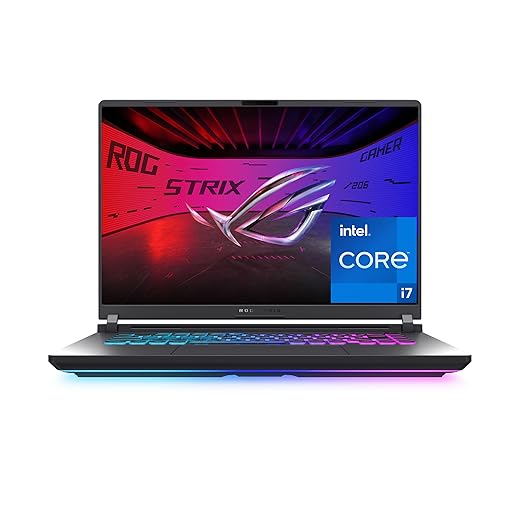
ASUS ROG Strix G16 for fast, lower-resolution play
Strong esports performance with fast display and Wi-Fi 7
The Strix G16 pairs an RTX 5060 with Intel’s Core i7-14650HX, a 14th-gen HX chip that still has the high clocks and plentiful cores competitive games reward. Its 16-inch 1920×1200, 165Hz panel favors frame rate over pixel density—a sensible match for players chasing low input latency in Valorant, Fortnite, or esports shooters.
This is the configuration to consider when a clearance tag makes a proven, performance-first chassis materially cheaper than newer RTX 5060 machines. The 1TB PCIe 4.0 drive is a workable starting point, while tool-free RAM and SSD access makes the laptop less fixed than many sale-bin alternatives.
- 165Hz/3ms 16:10 panel suits high-FPS competitive play
- Core i7-14650HX is a strong pairing for CPU-bound esports titles
- Tri-fan cooling is built for sustained gaming loads
- Tool-free memory and SSD access extends useful life
- 1TB SSD avoids an immediate storage upgrade
- 16GB RAM is merely adequate for a premium 2025 gaming laptop
- FHD+ resolution looks less sharp for single-player games and work
- RTX 5060 has 8GB VRAM, limiting long-term texture headroom
- Older 14th-gen platform weakens a modest clearance discount
Quick take The screen and cooling make sense for competitive play, but the configuration needs a real price gap. At near-current-model money, equivalent RTX 5060 laptops can bring newer silicon, 32GB memory, or a faster QHD panel.
Buy only at a meaningful clearance price. The 165Hz display, capable HX processor, and substantial cooling give this Strix credible competitive-game credentials, and its upgrade access softens the 16GB RAM limitation.
The catch is timing: an RTX 5060 is not rare performance. When newer RTX 5060 systems sit close in price with a 240Hz QHD display, 32GB of RAM, or a fresher CPU platform, the older Strix stops being the bargain—even if the clearance label remains.
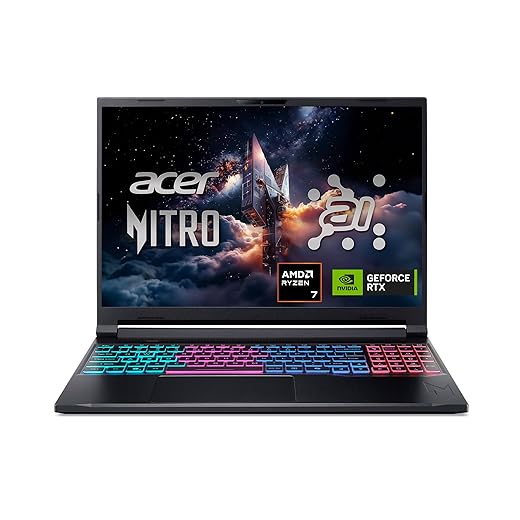
Acer Nitro V 16S AI for campus-and-commute gaming
Slim design pairs portable gaming with generous memory
At 4.6 lb, the Nitro V 16S AI makes a stronger case for regular travel than the usual 16-inch performance machine. Its Ryzen 7 260, RTX 5060, 32GB of DDR5 memory, and 1TB Gen 4 SSD provide a well-rounded starting point for classwork, creative tasks, and current games without immediately relying on upgrades.
The 16-inch WUXGA IPS 180Hz panel favors smooth play and useful vertical workspace over a sharper QHD image. Its slim chassis is the appeal, but a clearance listing still deserves a check for the charger’s size, return status, and documented memory/storage access.
- 4.6-lb chassis is manageable for frequent carrying
- 32GB RAM and 1TB SSD avoid early upgrade pressure
- RTX 5060 offers current-generation graphics capability
- 180Hz IPS panel suits fast-paced games
- WUXGA resolution is less crisp than QHD alternatives
- 16-inch footprint and charger still add commuter bulk
- Quad-intake cooling may become noticeable during demanding games
- Upgrade access should be confirmed before purchase
Quick take A sensibly equipped RTX 5060 laptop that puts more of its value into everyday practicality than maximum screen resolution.
This is the clearance candidate for buyers who need gaming capability to travel rather than remain on a desk. 32GB RAM is a meaningful advantage at this tier, and the 4.6-lb weight keeps the 16-inch format credible for a backpack. Around $1,450, the deal holds up only when its complete configuration and return terms compare favorably with newer RTX 5060 rivals; a sharper QHD panel may matter more for desk-first use.
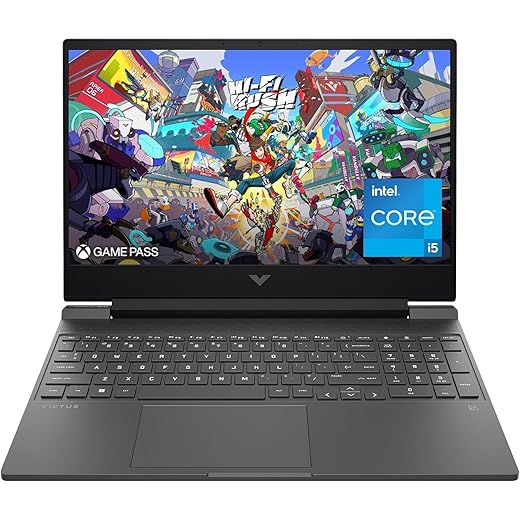
HP Victus 15: a 6GB RTX 3050 only at a true closeout price
A lower-cost choice for everyday gaming and multitasking
This Victus is an entry route into 1080p PC gaming, not a long-term answer to every new release. Its Core i5-12450H, 16GB of RAM and 144Hz Full HD panel fit competitive games and a substantial back catalog particularly well; the RTX 3050’s 6GB of VRAM sets the boundary for newer, texture-heavy AAA games.
At the listed ~$840, it is difficult to justify beside clearance RTX 4050/4060 and newer RTX 50-series options. Before ordering, confirm that the exact seller SKU really includes the discrete 6GB RTX 3050, since marketplace listings can carry conflicting specification fields.
- 16GB RAM avoids the immediate upgrade tax
- 144Hz 1080p panel suits esports well
- 6GB RTX 3050 is preferable to older 4GB variants
- Core i5-12450H remains capable for mainstream play
- ~$840 is far too close to faster GPU tiers
- 6GB VRAM restricts new AAA texture settings
- Ray tracing is generally a settings-off feature
- Marketplace specification conflicts need verification
The price rule Buy only at $600 or less with 16GB RAM and the confirmed 6GB RTX 3050. From roughly $650 upward, waiting for an RTX 4050, RTX 4060, or newer-GPU clearance is the smarter move.
The sensible expectation is high-frame-rate esports, older AAA games, and carefully tuned 1080p—not universal high settings for the next several years. A confirmed 6GB RTX 3050, 16GB RAM, and a price at or below $600 make this a defensible clearance purchase. At its stated price, the GPU is simply too old for the money; waiting preserves far more performance headroom.
Inspect open-box and display units like used hardware
-
Match the exact SKU and condition
Confirm GPU, RAM, storage, panel resolution, and the condition grade against the listing; similar model names often conceal weaker configurations.
-
Check the chassis and screen under bright light
Look for hinge looseness, dented corners, stripped screws, keyboard shine, dead pixels, pressure marks, and uneven backlight. A display unit can have hundreds of heat cycles and constant panel use.
-
Verify the complete kit
The original high-wattage charger is essential, particularly for RTX systems. Missing adapters, documentation, or packaging should lower the price, not become an afterthought.
-
Test battery health and every port
Run the manufacturer diagnostics where available, inspect battery-report capacity, then test USB-C charging/display output, USB-A, HDMI, audio, Wi-Fi, webcam, and the charging connector.
-
Get return and warranty terms in writing
Open-box coverage, restocking fees, and manufacturer warranty transfer can vary by condition and store. Confirm the return window before paying.
Photograph any existing wear at pickup; it helps distinguish pre-existing damage from a later problem.
A display laptop is not merely an open box: its keyboard, hinges, fans, battery, and panel may have endured continuous public use. A token discount rarely compensates for that history.
Treat a floor model as worthwhile only when its price sits materially below an equivalent sealed clearance unit and the return policy leaves enough time for sustained gaming and charging tests.
Timing the clearance cycle
New models often push prior configurations aside during spring inventory transitions, holiday assortment resets, and late-summer back-to-school promotions. Manufacturer replacement cycles can do the same, especially when a laptop carries an outgoing GPU or CPU generation. Those periods create more chances to find a deal; they do not ensure the lowest price will arrive later.
A strong clearance price can disappear when stock becomes scarce, while a weak one may linger through several “sale” events. Track the all-in total: sale price, membership requirement, shipping, tax, and any protection-plan cost needed for the desired coverage. Compare the final figure with current machines, not the crossed-out MSRP.
Legitimate savings can improve further through rewards, trade-in credit, or an opportunity to combine a student discount with retailer savings. Before ordering, save screenshots of the advertised SKU, configuration, condition, price, dates, and return terms. Listings can change after checkout, and that record makes a mismatch far easier to resolve.
Buy the Acer Predator Helios Neo 18 AI when a desk-bound setup needs high-refresh QHD gaming, 32GB of memory, and 2TB storage without immediate upgrades. Choose the ASUS ROG Strix G16 for competitive titles where its 165Hz FHD+ panel and cooling matter more than pixel count. The Acer Nitro V 16S AI is the sensible carry-around RTX 5060 option. Take the HP Victus 15 only at $600 or less for carefully tuned 1080p play.
Before payment, confirm the exact SKU, condition, charger, return window, and protection plan; then compare today’s RTX 5060 pricing. A clearance tag earns its place only when every compromise is already reflected in the final total.