A powerful laptop can be travel-friendly—until its power brick joins the packing list.
At the airport gate, the problem is rarely the laptop alone: a 16-inch machine, its AC adapter, mouse, headset, and a few cables can turn a tidy personal item into an overstuffed bag. The charger deserves the same scrutiny as the chassis. Its bulk, cable length, and plug shape determine whether the system is genuinely easy to unpack at a lounge table or hotel desk.
Gaming performance also changes on battery. Discrete GPUs commonly run at reduced power away from the wall, so a buyer should check the claimed battery runtime and whether the supplied adapter is practical to carry daily. A compact 14.5-inch model may leave room for essentials; a larger 16-inch display can be worthwhile when its screen and cooling matter more than bag space.
- Confirm the included adapter’s dimensions and wattage.
- Allow room for a mouse, headset, and a universal plug adapter.

Match the laptop to the trip
A laptop that is ideal for a few hotel nights can become exhausting after a month of airport connections. Start with the travel pattern, then accept the compromises it makes sensible.
- Occasional hotel play: A 16-inch performance model is often the sweet spot. Its larger cooling system and brighter screen matter more than an extra pound when it rides in a car or is unpacked once a day.
- Frequent business travel: Prioritize a 14-inch or slim 15/16-inch chassis, USB-C charging for office work, and a discreet design. A lower-wattage GPU is usually a better trade than carrying a 280 W brick through terminals.
- LAN weekends: Ports, upgradeable storage, Ethernet, and sustained performance outrank battery life. A 16-inch machine with a full-power GPU earns its bulk when local multiplayer and external displays are involved.
- Long-haul flights: Battery endurance, a compact charger, quiet fans, and a 14-inch footprint matter most. Demanding games should be treated as plugged-in entertainment, not a seat-back-battery expectation.
- One machine for work and play: Seek strong CPU performance, 32 GB RAM, a color-accurate screen, and two SSD slots. This class should feel credible in a meeting without giving up evening gaming.
Measure the whole carry-on kit
-
Total packed mass
Weigh the laptop, charger, cable, mouse, and protective sleeve together. A 0.4 kg difference that seems trivial at a desk becomes noticeable through terminals, trains, and long concourses.
Look forAbout 2.0 kg or less for the complete daily kit.AvoidJudging portability by the laptop’s chassis weight alone. -
Charger volume
A compact 100–140 W USB-C GaN adapter can transform a travel setup, provided it supplies enough power for the intended workload. High-wattage proprietary bricks often add more bulk than their watt rating suggests.
Look forA small adapter that fits in the bag’s accessory pocket.AvoidA 280 W brick treated as an afterthought. -
Footprint and thickness
Width and depth decide whether the machine slides into a personal-item sleeve, airline tray table, or cramped café table. Thickness matters twice: it consumes bag depth and makes a loaded backpack sit farther from the back.
Look forA 14-inch-class footprint and a profile near 20 mm.AvoidA wide 16-inch chassis that leaves no room for essentials. -
Bag fit with protection
Check the bag’s actual laptop compartment dimensions, including zipper opening and padding, rather than its advertised screen-size rating. A snug sleeve protects edges without turning the laptop into a bulky package.
Look forEasy insertion with a sleeve and room for cables.AvoidForcing corners past a tight zipper or carrying it loose.
A laptop that is 300–500 g lighter, plus a charger that saves another 200 g, can remove nearly a kilogram from a shoulder bag. That relief is felt repeatedly: lifting the bag into an overhead bin, walking between gates, and unpacking at every stop.
For frequent travel, packed weight and bag shape usually matter more than an extra few frames per second.
Performance per pound wins
A laptop’s GPU name is only the starting point. An RTX 4070 running at 80 W in a slim 14-inch chassis can trail the same chip at 140 W by a meaningful margin, while a higher-tier GPU forced into a tight thermal envelope may deliver little advantage for its extra weight, price, and charger. Compare the GPU power limit (TGP) and independent game tests at the screen’s native resolution, not just the badge.
CPU choice matters differently. A modern H- or HX-class processor helps CPU-heavy strategy games, simulation titles, compiling, and video work, but it also raises heat and fan demand. For travel-first gaming, an efficient H-class CPU paired with a properly powered midrange GPU is often the sweeter system: less sustained throttling, smaller power brick, and fewer occasions when the fans dominate a hotel room.
Build a balanced spec
- Memory: 16 GB remains workable, but 32 GB gives modern games, browsers, and background travel work needed breathing room. Prefer upgradeable SO-DIMMs where possible.
- Storage: A 1 TB SSD avoids constant install juggling; a second M.2 slot is more valuable than an oversized factory drive if expansion is likely.
- Display target: A 1600p or 1440p panel is excellent, but demanding games may be happier rendered below native resolution.
- Upscaling: DLSS, FSR, and XeSS can turn a 60 fps compromise into a smooth 90 fps experience with modest image-quality loss. Frame generation is useful, but cannot fix poor base frame rates or input latency.
Sustained performance matters more than a short benchmark burst. Look for reviews with 30-minute gaming runs, surface-temperature readings, and noise measurements. A machine that holds its clocks quietly at 100 W is usually a better carry-on companion than one that briefly reaches 150 W before becoming hot, loud, and throttled.
Choose the screen for the places it will be used
A 14-inch panel is the better companion for frequent airport-to-meeting travel: it fits shallow tray tables, needs less desk depth, and usually saves several hundred grams. A compact 16-inch 16:10 model is far more comfortable for spreadsheets, timelines, and hotel-room gaming; its extra vertical space matters as much as the wider image.
Resolution should suit the GPU and the screen size. 1600p looks crisp on either format, but asks more of the GPU than 1200p/1080p. For an RTX 4060-class machine, 1600p works best when DLSS or frame generation is acceptable; native 1080p/1200p preserves battery and steadier frame rates.
Prioritize the qualities that survive travel
- Brightness: seek 400 nits or more. A 300-nit panel is fine in a dim hotel room but struggles beside windows.
- Glare: matte coatings are less dramatic than glossy OLED, yet far easier to use under overhead lighting.
- Motion: 120–165 Hz with VRR makes varying hotel-room frame rates feel smoother; 240 Hz is rarely worth the battery or price premium.
- Color: 100% sRGB is the floor for photo work. Wide-gamut displays need a good sRGB mode, or ordinary web content can look oversaturated.
OLED delivers superb contrast, but its reflective surface and higher power draw can make a bright, matte IPS screen the more practical travel display.
Treat power as part of the laptop
A travel gaming laptop is only as portable as the power it can accept—and the performance it retains when its main adapter stays in the room. USB-C Power Delivery is a convenience feature, not automatically a full-performance mode.
A 100 W USB-C charger can usually handle browsing, writing, video playback, and light creative work on an efficient 14-inch machine. It may also restore charge during those tasks. Under a demanding game, however, a CPU and discrete GPU can require 140–250 W or more; the laptop will cap power, drain its battery alongside the adapter, or both. Some 140 W USB-C implementations improve the margin, but still rarely equal the supplied 200 W-plus brick.
Check the fine print before packing
Confirm the manufacturer’s limits for USB-C input wattage, battery charging, and performance mode. A port that supports DisplayPort and data is not necessarily a charging input, and a USB-C charging logo does not promise unrestricted GPU power. Test the intended charger at home: launch a sustained game, watch battery percentage, and check whether the performance profile silently changes.
The supplied charger deserves the same scrutiny as the laptop. Compare its weight, cable length, and connector shape, then consider the complete travel chain:
- hotel and airport outlets may be loose, scarce, or limited to low wattage;
- a compact plug adapter changes wall pins, but not voltage;
- most modern power bricks accept 100–240 V automatically—verify the label;
- high-wattage USB-C chargers need a correctly rated e-marked cable.
A small GaN USB-C charger is excellent for daytime work. For evening gaming, the original adapter is usually the non-negotiable item.
Many seat outlets are limited to roughly 75–110 W and may cut out under load. Treat them as a way to top up or run light work, not as a dependable source for an RTX laptop during a game.
Cooling is the travel-time compromise
A thin chassis has little thermal mass and limited airflow. The relevant test is not a 30-second benchmark; it is a 30-minute game after the room has warmed up. Expect CPU and GPU power to settle below their headline limits, especially in 14-inch models.
Performance mode is a location decision. Turbo modes may add a few frames, but often bring a high-pitched fan profile that is unwelcome in a lounge, train, or shared hotel room. A balanced mode, 60–90 fps cap, and DLSS/FSR or frame generation usually produce the better travel experience.
Check reviews for sustained clocks, fan tone rather than only decibel figures, and keyboard-deck temperatures. Warm exhaust is normal; uncomfortable WASD keys, a scorching underside, or fans that constantly surge are not. On soft bedding, airflow collapses quickly—use a hard desk or even a slim stand.
In a warm hotel room, cap the frame rate and select Balanced mode before launching a game. Lower heat reduces throttling, so frame pacing can improve even when the peak fps number falls.
Pack around the ports actually in use
-
Map the daily kit before choosing a chassis
List the real travel companions: mouse, headset, controller, SD card, Ethernet, external SSD, and hotel-room display. For bringing a gaming laptop on a plane, fewer separate adapters also means fewer items to remove, repack, or lose at security.
-
Reserve USB-C for high-value jobs
A full-featured USB-C port with DisplayPort output and Power Delivery can handle a portable monitor, dock, or fast SSD. Confirm its bandwidth and charging limit; not every USB-C port supports video, and low-wattage input will not sustain gaming.
-
Demand a native display connection
HDMI 2.1 is the simplest route to modern TVs and many hotel displays. For a high-refresh external monitor, USB-C DisplayPort or a dedicated DisplayPort output avoids uncertain hub compatibility; verify that the port is wired to the discrete GPU when high refresh or VRR matters.
-
Keep one compact, proven fallback
A short USB-C-to-HDMI adapter or small multiport hub is sensible insurance, not a substitute for native ports. Test it with the laptop, charger, and display before departure.
-
Treat wireless as a backup, not the plan
Wi-Fi 6E or Wi-Fi 7 helps on less crowded networks, but hotel portals, weak signals, and congested airport Wi-Fi remain common. Bluetooth mice and headsets should be paired in advance, with a wired option available for latency-sensitive play.
An RJ-45 port remains valuable for tournament venues or unreliable hotel Wi-Fi; otherwise, a compact USB Ethernet adapter is easier to justify than carrying a large dock.
A laptop with two USB-C ports, two USB-A ports, HDMI, and a headphone jack usually eliminates the travel dock. One USB-C port can stay free for charging or a display while the other handles storage; the USB-A ports keep mouse and receiver separate.
Pack cables in a small, labeled pouch and keep the single essential adapter beside the charger. That makes screening faster and prevents the familiar arrival-night search for a missing HDMI converter.
Pick the burden that suits the trip
Premium power in less bag
For the traveler who alternates spreadsheets, photo work, and evening games, this is the compelling compromise. Its 14.5-inch WQXGA matte, 165Hz G-SYNC display, Core Ultra 9 285H, RTX 5070 Laptop GPU, 32GB of RAM, and 1TB SSD avoid the usual “small laptop, compromised performance” formula.
The remaining burden is cost and a travel power plan: at roughly $1,800, it is not a casual purchase, and sustained gaming still calls for its proper adapter. Among lightweight gaming laptops that retain serious graphics power, though, the smaller screen footprint makes the most sense for weekly flights and mixed-purpose hotel use.
Value-minded, screen-first travel
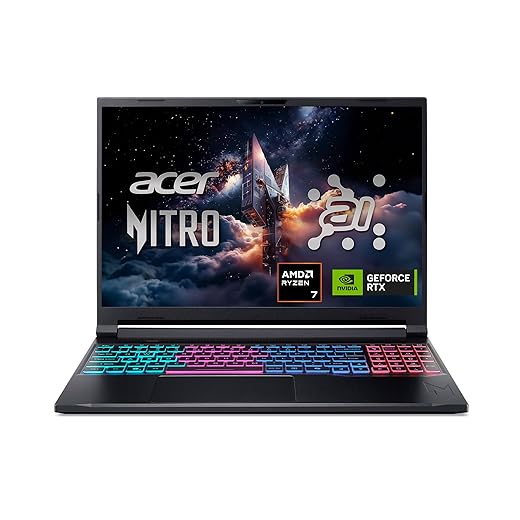
The Nitro V 16S targets travelers who can accept a 16-inch footprint in return for better value. Its Ryzen 7 260, RTX 5060 Laptop GPU, 32GB DDR5, and 1TB Gen 4 SSD form a capable modern baseline, while the 16-inch 180Hz WUXGA panel is easier to work on than a 14-inch screen.
“Slim” does not make the larger panel disappear in a personal-item bag. This fits occasional fliers, road trips, and travelers who want one machine for work and play without stepping up to flagship pricing.
Maximum frames, larger carry-on
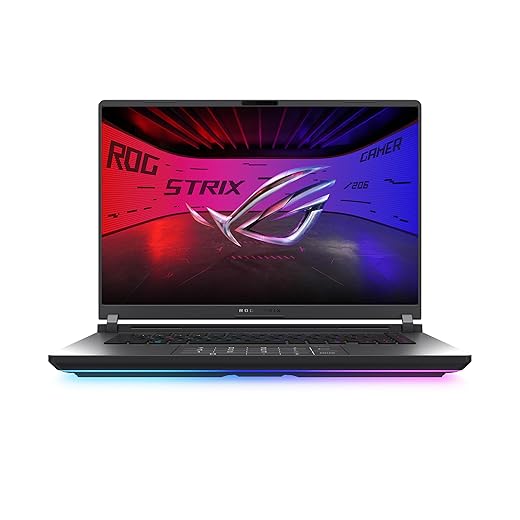
The Strix G16 is for the traveler whose destination justifies the kit. The RTX 5070 Ti, Core Ultra 9 275HX, 32GB DDR5, and 1TB PCIe 4.0 SSD are paired with a 16-inch 16:10 2.5K Nebula display at 240Hz, giving competitive games and creative workloads more headroom than the lighter-focused options.
That capability comes with the clearest carry-on trade: a 16-inch performance chassis, its full gaming adapter, and the space needed to protect it. It is best packed for longer stays, events, or trips where performance outranks minimum bulk.
Run one final packed-kit check
-
Test the actual bag
Compare the laptop’s measured footprint, thickness, and loaded weight with the carry-on or backpack—not its advertised class.
-
Add every essential
Include the original charger, cable, mouse, headset, adapter, and any external SSD. A slim laptop can become an awkward kit quickly.
-
Verify charging behavior
Confirm whether USB-C charging is sufficient for airport work, how much performance drops unplugged, and whether the supplied brick works at destination voltage.
-
Read sustained reviews
Look for long gaming runs, noise recordings, surface-temperature tests, and Balanced-mode results rather than short benchmark charts.
-
Check support where it travels
Confirm international warranty terms, local repair access, parts availability, and return handling before crossing borders.
- The advertised laptop weight is rarely the weight carried.
- A quieter, cooler balanced mode can be more valuable than a higher Turbo benchmark.
The right travel gaming laptop is the one that still fits the bag, powers the complete kit, and performs predictably after its charger, thermals, and travel compromises are accounted for. Enough sustained performance is the feature that earns carry-on space.