The best travel gaming laptop is the one that still feels quick after an hour of play—not merely light on a spec sheet.
A 16-inch machine can seem perfectly portable in a store, then become a burden once its large power brick, mouse, headset, and charger are in the bag. Total travel weight matters; so does whether the laptop stays quiet enough, cool enough, and fast enough when it is unplugged from the desk.
Modern games expose the compromise quickly. A thin chassis with a capable RTX GPU may deliver excellent frame rates in short bursts, yet lose ground if its cooling system cannot sustain wattage. The useful sweet spot is a laptop that pairs a reasonably efficient CPU and GPU with sensible power limits, enough RAM, and a high-refresh display—rather than chasing the lowest kilogram figure. Carryability is a system, not a number.
- Expect the charger to add roughly 0.5–1.0 kg to the real bag weight.
- GPU power limit and cooling often matter more than the GPU name alone.
The lightest option is not always the easiest to carry
-
Under 1.8 kg: travel-first
This is genuinely easy to carry daily, but usually demands lower GPU power limits, smaller batteries, or more fan noise under load.
PreferA GPU with credible sustained performance, not just a high-tier name.Be wary ofAssuming an ultralight chassis can match a thicker model's frame rates. -
1.8–2.2 kg: the practical sweet spot
Most capable portable gaming machines sit here, with room for a useful cooling system and a 14- to 16-inch display.
PreferA compact footprint and a GPU power rating stated by the manufacturer.Be wary ofComparing weights while ignoring chassis depth and width. -
2.2–2.6 kg: performance carried occasionally
Still backpackable, but best for moving between desks rather than commuting all day. Higher sustained wattage is more plausible here.
PreferStable long-session clocks and sensible exhaust clearance.Be wary ofCalling it lightweight based on laptop weight alone. -
The full carry load matters
A 230 W brick can add roughly 0.7–1.0 kg. Resolution matters too: QHD or OLED panels can ask more of the GPU than 1080p.
PreferLaptop, charger, and cable weight together; performance at native resolution.Be wary ofTesting only short benchmark bursts on wall power.
Retailers can sell the same chassis with different GPUs, wattage limits, panels, batteries, and chargers. Before ordering, confirm the exact SKU, listed weight, GPU TGP, screen resolution, and included power adapter.
For broader context, this guide to lightweight gaming laptops helps separate genuinely portable systems from merely thin-looking ones. A lower-weight configuration can be the smarter choice when its native-resolution performance and sustained thermals fit the games it will actually run.
Five compact gaming laptops worth considering
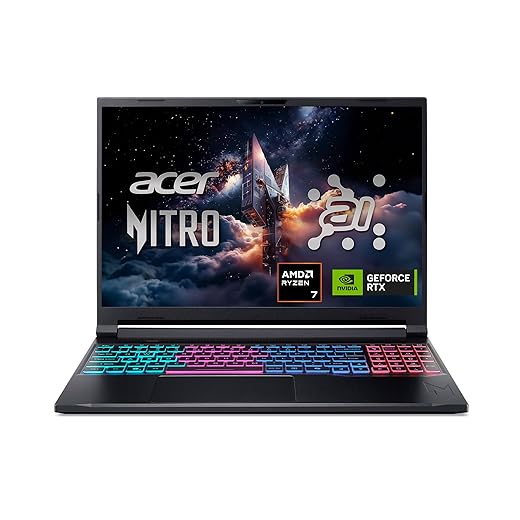



A slim 16-inch gaming laptop built for frequent travel
01
Best balance of portable design and modern gaming power
The Acer Nitro V 16S AI is the sensible middle ground for travelers who want a proper gaming machine rather than an ultraportable with compromised graphics. At 4.6 lb, its slim, gaming-first chassis remains manageable in a backpack while leaving room for a 16-inch 180Hz screen, Ryzen 7 260 processor, and RTX 5060 Laptop GPU.
Its “AI” branding has practical relevance beyond marketing: the CPU’s AI engine and Nvidia’s current-generation GPU support modern AI-assisted workflows and game features. Still, this is a retailer-SKU purchase—confirm the exact GPU configuration, memory, storage, and panel before judging the deal.
- 4.6 lb chassis is unusually travel-friendly for a 16-inch gaming laptop
- RTX 5060 Laptop GPU offers credible modern-game headroom
- 180Hz WUXGA panel favors fast-paced competitive play
- 32GB RAM and 1TB Gen4 SSD are generous in this listed configuration
- Quad-intake cooling is designed for sustained gaming loads
- WUXGA resolution prioritizes frame rate over sharper QHD-class detail
- A 16-inch system and its power brick still occupy meaningful bag space
- Laptop GPU performance varies with the power limit, which must be verified
- Retail listings may substitute a different panel or memory/storage configuration
For regular travel and current games, the Nitro V 16S AI lands in a particularly useful sweet spot. It keeps a 16-inch, high-refresh gaming experience within a 4.6 lb package without stepping down to integrated graphics. Its final value depends on the retailer SKU: verify the GPU power specification and exact display before buying.
A lighter, lower-cost lane for everyday competitive play
Best for affordable everyday gaming portability
At roughly 4.3 lb, the MSI Cyborg A15 AI is aimed at the person who wants one machine for lectures, commuting, and evening matches without moving up to a heavier performance chassis. This listed configuration pairs a Ryzen 7 260 with GeForce RTX 5050 graphics, 16GB of DDR5 memory, a 1TB SSD, and a 15.6-inch 144Hz Full HD panel.
It makes the most sense for esports staples, indie games, and well-tuned AAA releases at sensible 1080p settings. In this class, the model name alone is not enough: retailers can carry variants with different GPU power limits, memory layouts, panels, and cooling behavior. Confirm the exact SKU before treating one Cyborg A15 result as representative of them all.
- 4.3 lb is manageable for regular carry
- 144Hz Full HD suits fast esports play
- 1TB SSD avoids an immediate storage upgrade
- RTX 5050 supports modern 1080p features, including DLSS
- GPU wattage is not stated in the listing
- Thin cooling may limit long-session sustained clocks
- 16GB memory can be restrictive in demanding new games
- Panel quality beyond refresh rate needs verification
- Esports players
- Campus carry
- 1080p gaming
- Maximum settings
- Long AAA sessions
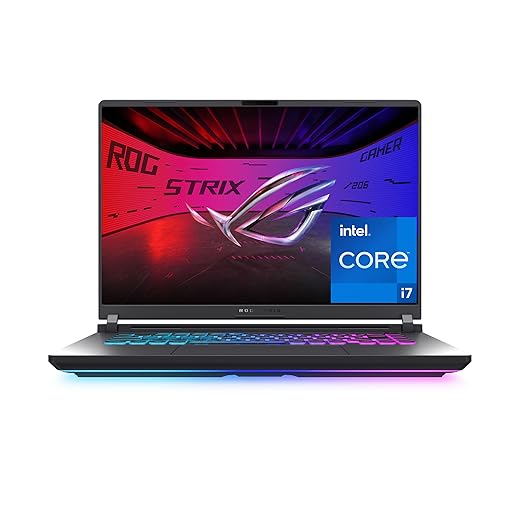
ASUS ROG Strix G16: built to hold speed under pressure
High-end performance for serious gamers on the move
The ROG Strix G16 is the sensible step up when gaming headroom matters more than shaving every possible gram from the bag. Its Core i7-14650HX and RTX 5060 pairing is aimed at the games that expose thin-and-light compromises: CPU-led simulation and strategy workloads, ray-traced single-player releases using DLSS 4, and fast competitive play where stable frame times matter as much as a high average FPS.
The 16-inch, 165Hz FHD+ panel gives that hardware a practical target, rather than demanding the GPU drive a native 1600p or 2400p screen. ROG’s tri-fan cooling is part of the proposition: this is a machine intended for longer sessions, not merely short benchmark bursts. Tool-free RAM and SSD access also makes it a more durable choice for owners who expect game installs and memory needs to grow.
- Core i7-14650HX suits CPU-heavy games and multitasking
- RTX 5060 supports modern ray tracing and DLSS 4 features
- 165Hz, 3ms FHD+ display fits high-frame-rate play
- Tri-fan cooling targets sustained rather than short-burst performance
- Tool-free RAM and SSD access simplifies upgrades
- At 2.65 kg, it is markedly less convenient than travel-first options
- A large performance chassis and its charger add meaningful bag bulk
- 165Hz panel is FHD+ rather than a sharper QHD+ canvas
- 16GB RAM may become restrictive in demanding modded or creator workloads
- CPU-heavy games
- Ray-traced releases
- Competitive gaming
- Ultralight travel
- Small bags
Lenovo Legion 5a for OLED-first gaming and creative work
Premium OLED visuals with generous memory and storage
The Legion 5a is the natural fit when the screen matters as much as frame rate. Its 15.3-inch 2560×1600 OLED panel brings true blacks to dark game scenes, richer HDR highlights, and 100% DCI-P3 color coverage for photo, video, and color-conscious creative work. NVIDIA G-SYNC and a 165Hz refresh rate help motion stay clean rather than merely colorful.
That resolution contains nearly twice the pixels of 1080p, so native 1600p is a meaningful workload for the RTX 5060—especially in new ray-traced games. Selective settings reductions or upscaling may be the sensible route to high-refresh performance. The quoted 1,000-nit peak is most relevant to small HDR highlights, not sustained full-screen brightness.
OLED ownership also rewards basic habits: allow the panel’s protection routines to run, use a screen timeout, and avoid leaving HUDs, editing timelines, or desktop elements unchanged for long stretches. With 32GB of RAM and a 1TB SSD, this configuration has the supporting hardware for a player who also creates.
- OLED contrast, HDR impact, and 100% DCI-P3 color
- 165Hz refresh with G-SYNC
- 32GB RAM supports demanding creative multitasking
- 1TB SSD provides a practical starting capacity
- Native 2560×1600 demands more GPU power than 1080p
- Peak-brightness figures do not describe full-screen output
- OLED benefits from sensible static-image precautions
- Premium price for this display-focused configuration
- HDR game fans
- Creative multitaskers
- OLED devotees
- Lowest-cost shoppers
- Native 1600p purists
Alienware 16 Aurora: polished design over minimum carry weight
Distinctive design with strong cooling and RTX graphics
The Alienware 16 Aurora is the more design-conscious alternative in this group: a 5.5 lb, 16-inch machine with an anodized-aluminum lid, a restrained blue finish, and a layout that includes a backlit keyboard and numeric keypad. Its WQXGA 16:10 panel gives games and everyday work more vertical room than a standard 16:9 screen, while the anti-glare finish is welcome away from a dark desk.
This configuration combines Intel’s Core 7 240H with an RTX 5060 and Alienware’s Cryo-Chamber cooling approach. It suits someone who wants a substantial, well-finished laptop with Dell’s included one-year onsite service—not someone chasing the lightest bag or the most frames per dollar. Before buying, confirm the memory, SSD capacity, panel refresh rate, and GPU power limit; those details can change the value equation materially.
- Anodized-aluminum lid and notably polished presentation
- 16:10 WQXGA anti-glare screen adds useful workspace
- RTX 5060 paired with dedicated airflow-focused cooling
- One year of onsite service is meaningful premium support
- Numeric keypad and backlit keyboard suit mixed work use
- 5.5 lb is heavy beside genuinely travel-first options
- 300-nit brightness is merely adequate in bright rooms
- Refresh rate and GPU wattage are not specified here
- Premium styling does not automatically equal best value
- Premium finish
- Desk-and-travel use
- Support priority
- Ultralight travel
- Maximum value
Its power limit and cooling design set the real pecking order.
A higher-wattage GPU that holds clocks can beat a thinner machine carrying the same badge, especially in long AAA sessions.
1600p looks sharper, but it asks far more of the GPU than 1080p/FHD+.
For demanding games, DLSS or FSR upscaling and frame generation can make high-resolution play feel fluid; native rendering may require lower settings.
Refresh rate, response time, and GPU output must work together.
A 165Hz or 180Hz panel shines in esports, while cinematic AAA titles may run nearer 60–100 fps. A MUX switch or Advanced Optimus can avoid integrated-graphics overhead when plugged in.
16GB RAM is workable; 32GB is the safer long-term target, and an open M.2 slot matters.
Modern games increasingly reward extra memory, while 1TB fills quickly. Confirm whether RAM is soldered and whether a second SSD slot is accessible.
For each exact retailer SKU, check the GPU wattage/TGP, VRAM amount, RAM layout, SSD slots, panel resolution, and whether a MUX mode is available. Those details determine whether a light laptop remains satisfying after the first few game installs and the next generation of demanding releases.
-
Count the power brick
A 1.9 kg laptop plus a 700–900 g proprietary adapter can rival a heavier machine with a compact GaN charger. Charger weight matters as much as laptop weight on a daily commute.
-
Treat USB-C as a travel convenience
A 100 W USB-C charger is excellent for notes, browsing, video, and light creative work. It rarely replaces the included adapter for sustained GPU gaming; the battery may still drain under load.
-
Match the bag to the journey
Campus and rail travel favor a 100–140 W GaN charger, short cable, and compact mouse. Flights add a power-bank-sized charger only when airline and outlet limits allow; hotel gaming calls for the full-power brick.
-
Trim peripheral bulk deliberately
A slim mouse, fold-flat headset or earbuds, and one USB-C hub save more space than a full keyboard. Reserve controllers and external SSDs for games that genuinely benefit from them.
For a long evening on an RTX-equipped laptop, pack the manufacturer adapter: it supplies the wattage needed for high GPU limits and avoids battery draw. For meetings, lectures, and airport downtime, a quality USB-C PD GaN charger can make the bag dramatically lighter. Confirm the laptop’s accepted USB-C input wattage, cable rating, and whether charging is supported on the chosen port before relying on it.
- A few extra ounces are often repaid by steadier frame times and less throttling away from a desk.
Choose the Acer Nitro V 16S AI for the strongest travel-first balance: manageable weight with RTX 5060-class headroom. The MSI Cyborg A15 AI Thin is the sensible low-cost, 1080p-focused pick. For long gaming sessions, the heavier ROG Strix G16 earns its place with cooling built for sustained output.
Pick the Lenovo Legion 5a when its 165Hz OLED is the priority, or the Alienware 16 Aurora for premium styling and support—not minimum bag weight. A small weight saving is rarely worth lower sustained GPU power.
Confirm the listed GPU and its wattage/TGP, RAM configuration, panel resolution and refresh rate, storage, laptop weight, and included charger. Retailer listings can share a model name while changing the parts that determine real gaming performance.